
Saturday, July 9, 2011
 CSS is a fun thing to play with. With the growing development of cascading style sheet and with the accepting compatibility of new browsers, web designing is becoming more and more creative. We once used Photoshop to manually add drop shadows to images but now thanks to CSS3 you can add drop shadows to all your images automatically. We will learn today how to minimize the size of large images and how can we make them expand to their original size on mouse hover. I am sure you will love it :)
Please see a demo first,
How To add Drop Shadows and Enlarge Images on Mouse Hover?
The methods are really simple.- Go to Blogger > Design > Edit HTML
- Back up your template
- Search for ]]></b:skin>
- Just above ]]></b:skin> paste the following code,
.MBT-CSS3 img{
-webkit-transform:scale(0.7); /*Webkit 0.7 times the original Image size*/
-moz-transform:scale(0.7); /*Mozilla 0.7 times the original Image size*/
-o-transform:scale(0.7); /*Opera 0.7 times the original Image size*/
-webkit-transition-duration: 0.5s; /*Webkit: Animation duration*/
-moz-transition-duration: 0.5s; /*Mozilla Animation duration*/
-o-transition-duration: 0.5s; /*Opera Animation duration*/
opacity: 0.5;
margin: 0 10px 5px 0;
}
.MBT-CSS3 img:hover{
-webkit-transform:scale(1.1); /*Webkit: 0.5 times the original Image size*/
-moz-transform:scale(1.1); /*Mozilla 0.5 times the original Image size*/
-o-transform:scale(1.1); /*Opera 0.5 times the original Image size*/
box-shadow:0px 0px 30px gray;
-webkit-box-shadow:0px 0px 30px gray;
-moz-box-shadow:0px 0px 30px gray;
opacity: 1;
}
If you wish to further decrease the image size then decrease 0.7 or if you wish to further fade the image then decrease 0.5
You are almost done. Now when ever you want the image to appear with this effect, simply use this code,
<div class="MBT-CSS3">Upload your image to Blogger editor and replace Image URL Goes Here with your image link. You are done. Now visit your blog to see the effect working in action and yell out Bravo! :P
<img src="Image URL Goes Here" />
</div>
If you wish to add this effect to another image just keep on adding <img src="Image URL Goes Here" /> before </div>
This effect is compatible with latest versions of Mozilla, Safari, Opera, Chrome and as usual not that effective with boring IE. I just hope you liked it.
Saturday, July 9, 2011 0
Thursday, July 7, 2011
 Its really important to keep everything as attractive as possible while writing posts. Text Area boxes are a useful method of showing long bunch of text or code on your blog. Just last month I wrote two posts 25 Vertical Navigation Menus and 30 Horizontal Navigation Menus where I have used a lot of coding and all those coding were displayed inside fully customized text areas that made the post looked clean and neat. Text boxes are good only if there length and height is well controlled and today with this tutorial we will learn several ways of styling our default text areas.
Kindly see a demo first,
Before

After

How to Customize the Text Area Box?
To do this follow the steps below,- Go to Blogger > Layout > Edit HTML
- Search for </b:skin>
- And just above it paste the code below,
.mbt-textarea {4. Finally save your template!
padding:0;
margin:0;
background: #fff;
width:400px;
height:40px;
color:#666;
font:12px arial;
border:1px dotted #289728; }
.mbt-textarea:hover {
color:#289728;
border:2px solid #666;
}
How to show the Stylized Text Area Effect inside Blogger Posts?
To display this customized text area you only need to add the following code in the Edit HTML section of your Blogger Editor,<textarea class="mbt-textarea" readonly="readonly">WRITE-TEXT-HERE</textarea>
Simply replace WRITE-TEXT-HERE with your text that you want to appear inside a box.
How to Customize The CSS of The Text Box?
If you wish to change the font, color or in short the entire look of the text box then you just need to edit the following areas in the CSS code above,background: #fff; –> This Changes background color of the text area
width:400px; –> This changes width size of box
height:40px; -> This changes box height
color:#666; -> This changes font color inside text box
font:12px arial; –> This changes font size and font family respectively
border:1px dotted #289728; } –> This changes the border size, style (i.e dotted, solid, dashed) and color. Editing it will change the look of the border/outline across the text
.mbt-textarea:hover {
color:#289728; –> This changes font color on mouse hover
border:2px solid #666; -> This changes border size, style and color on mouse hover
Thursday, July 7, 2011 0
Wednesday, July 6, 2011
Google's new social networking site, Google+, launched to much fanfare last week. The new service, currently in invite-only stage, has created a buzz with its novel sharing and group video chat features.
The social network is Google's attempt to change the quasi-monopoly Facebook has enjoyed in the social media space for the past five years. But Google+ will also have far-reaching implications for search. And while some of the details of how Google + will ultimately affect search remain unclear, here are the key areas to watch below.
Search Results
Google suspended its Realtime Search on July 4. The search feature, which displayed Twitter feeds in real time, was turned off by Google because its contract with Twitter had expired. It is clear however, that the contract was not renewed because Google plans on including their own Google+ live feed into their searches, rather than Twitter's. So while the details remain murky, you should anticipate some iteration of Google +'s live feed displayed alongside search results in the near future.
Brand pages
 Google has said that their social network is not ready to support brand pages or profiles yet. Obviously, if it wants a chance to compete with the likes of Facebook, the company will have to offer brands a compelling profile or page to communicate with their followers. What kind of platform Google+ intends to offer brands is yet to seen.
URLs
Unlike Facebook, you can't yet claim your URL within Google+. This may be connected to the fact that the company hasn't rolled out brand pages yet, but either way, you'll have to wait until you can start printing your Google+ URL on your business cards.
Sparks Rankings
Sparks is Google+'s personalized content aggregator. Users can pick themes (such as cooking or cycle-cross, for example), and have content streamed to their profiles.
The SEO community is abuzz trying to decipher how, exactly, one would increase their chances of getting their content into Sparks. Some have speculated that the process is akin to getting on top of Google News pages. Barry Schwartz of seroundtable.com posted a reply from a Google exec saying that Sparks is "still very much in flux and being further expanded and tuned." Therefore, the SEO community continues to wait.
Posts
 Google indexes public posts from Google+, maknig them available in search results, both when you are logged in and logged out of Google+. Private posts do not currently show up in Google search. Google+ also indexes all comments made on public posts, which will undeniably hold substantial SEO weight.
Overall, Google+ has a lot of sharing to do about how, exactly, it intends to rank content.
If there is one main takeaway of the implications Google+ has on SEO however, it is that real users, not keyword-and-link-seeking robots, will increasingly rank and share content. A recent study highlighted the fact that Facebook usage is actually usurping time spent on the search-based internet. Without a doubt, Google+, with its built-in content aggregators through Sparks, will take us one step further to understanding the Internet not as centered around content, but around relationships.
The social network is Google's attempt to change the quasi-monopoly Facebook has enjoyed in the social media space for the past five years. But Google+ will also have far-reaching implications for search. And while some of the details of how Google + will ultimately affect search remain unclear, here are the key areas to watch below.
Search Results
Google suspended its Realtime Search on July 4. The search feature, which displayed Twitter feeds in real time, was turned off by Google because its contract with Twitter had expired. It is clear however, that the contract was not renewed because Google plans on including their own Google+ live feed into their searches, rather than Twitter's. So while the details remain murky, you should anticipate some iteration of Google +'s live feed displayed alongside search results in the near future.
Brand pages
 Google has said that their social network is not ready to support brand pages or profiles yet. Obviously, if it wants a chance to compete with the likes of Facebook, the company will have to offer brands a compelling profile or page to communicate with their followers. What kind of platform Google+ intends to offer brands is yet to seen.
URLs
Unlike Facebook, you can't yet claim your URL within Google+. This may be connected to the fact that the company hasn't rolled out brand pages yet, but either way, you'll have to wait until you can start printing your Google+ URL on your business cards.
Sparks Rankings
Sparks is Google+'s personalized content aggregator. Users can pick themes (such as cooking or cycle-cross, for example), and have content streamed to their profiles.
The SEO community is abuzz trying to decipher how, exactly, one would increase their chances of getting their content into Sparks. Some have speculated that the process is akin to getting on top of Google News pages. Barry Schwartz of seroundtable.com posted a reply from a Google exec saying that Sparks is "still very much in flux and being further expanded and tuned." Therefore, the SEO community continues to wait.
Posts
 Google indexes public posts from Google+, maknig them available in search results, both when you are logged in and logged out of Google+. Private posts do not currently show up in Google search. Google+ also indexes all comments made on public posts, which will undeniably hold substantial SEO weight.
Overall, Google+ has a lot of sharing to do about how, exactly, it intends to rank content.
If there is one main takeaway of the implications Google+ has on SEO however, it is that real users, not keyword-and-link-seeking robots, will increasingly rank and share content. A recent study highlighted the fact that Facebook usage is actually usurping time spent on the search-based internet. Without a doubt, Google+, with its built-in content aggregators through Sparks, will take us one step further to understanding the Internet not as centered around content, but around relationships.
Wednesday, July 6, 2011 0
Tuesday, July 5, 2011
 WordPress receives a lot of love from the blogging community, but Blogger.com is still a perfectly viable blogging platform for the majority of people.
In an effort to help those devoted Blogger users, we’ve gathered up the best of our lists about tools, themes and shortcuts for your preferred platform. Take a look through and you are sure to find something that will help you, even if you didn’t know you were looking for it!
Tell us what you think of these and any we might have missed, and let us know about your Blogger blog in the comments.
Free Template Resources

AllBlogTools.com – A collection of over 100 templates from an assortment of a lot of smaller designers. You can look them up by layout, color, subject matter and so on.
Blogger-Templates.Blogspot.com – Keeps a small selection of top-notch Blogger themes up and running.
Blogger-Templates.Deceblog.net – A small selection of unique themes for Blogger accounts.
Blogger-Templates-Directory.Blogspot.com – A large directory of Blogger templates, links to resources for further development and a whole lot more.
BloggerTemplates.org – Doesn’t seem to have been updated since it originally launched, but all of the templates still work, and have a lot of resemblance to WordPress themes.
BlogspotTemplates.Blogspot.com – Several pages of Blogger templates with tips on how to use them.
BlogspotTemplate.com – Right around 100 templates for Blogger of varying styles and colors.
BlogTemplates.Noipo.org – A small selection of graphical and text based templates for your blog.

Carl Galloway’s Blogger Templates – A small selection of some fairly unique templates that haven’t been updated in some time, but are still fully functional.
FinalSense.com – Offers over 300 templates for your Blogger account. Have just about every theme and color combination that you can think of.
FreeBlogger-Templates.Blogspot.com – Focuses heavily on simplified Blogger templates that make for the easiest reading possible.
FreeTemplates.Blogspot.coms – A blog dedicated to bringing you nothing but free Blogger templates. Nicely categorized, and easy to browse.
FreshBloggerTemplates.Blogspot.com – It has been a while since this site released any new templates, but their designs are very clean and still in working order.

GoSuBlogger.com – A large selection of free templates that mix original work with converted WordPress themes.
Isnaini.com – A large and varied collection of templates for use on Blogger, along with a detailed tutorial on how to properly insert them into your account.
JackBook.com – Besides offering a large selection of free templates, with a heavy saturation of video game inspired themes, JackBook also offers tips and pointers on better SEO for your blog.
OurBlogTemplates.com – An odd mix of nearly 200 free templates for you to use and with a dash of reviews of DSLR cameras.
PannaSmontana Templates – Numerous free templates for Blogger, but the site is entirely in Italian. Thankfully it is well designed and you can find your way around.
Public-Template.Blogspot.com – Features a mixture of free templates for you to download, tutorials on how to make your own, and admiration for templates they enjoy.
Simple-Blogskins.Blogspot.com – Offers a handful of free skins for your Blogger account.
Template-Godown.com – A site specializing in converting WordPress themes to the Blogger friendly XML format.
WP-Themes.us – Yes, the name points to them being all about WordPress themes, but they also provide a nice selection of free templates for Blogger.
Yanku-Template.Blogspot.com – Offers some very slick looking, free, Blogger templates of the 2 and 3-column varieties.
Premium Template Resources

PaperbackDesigns.Blogspot.com – Offers free themes and sidebar badges in addition to doing custom designed templates for a fee.
SuckMyLolly.com – A mixture of free and premium themes for your Blogger account. Very colorful in design and lacking the traditional Blogger look.
Tips & Tricks for Template Design

PhotoshopSupport.com – Tips for designing your own Blogger template, using Photoshop.
Fresh and Modern Blogger Templates
Aspire – A rustic look and calendar in the sidebar make this blog template perfect for history bloggers and traditional food bloggers.Cat – Glossy, shiny; great for a web 2.0 centric blog.

Erudite – I love the templates at this site. This particular one is very clean and can be easily customized.

Flower Pink Border – If you’re up for something different, try this combination of black and pink.
Gemstone – Very nice use of the header area and a good color combination.
Genesis – A three-column dark color theme with nice header tabs and sidebar header buttons.
Glass – Another personal favorite of mine, creates that “wow” effect right from the start.
GossipCity – A three column template that will give your blog that metro look with stars and shines.
History channel – A template based on the History Channel.

Leia – A popular template in three column. There are header tabs, and a big blog description space on the right-hand side.

Mosaico – A template design in mosaic style.
Navideno – A eye appealing treat with a fruity flavor.
O2 – This is a popular WordPress template ported to Blogger. It is a three column template with a bigger sidebar on top of two mini bars on the right hand side.
Rainbow Garden - Would you like to have your post decorated nicely with the garden flowers? This is the template for you then.
Red Girl – Quite a nice theme with a red background and an unusual style. You can put your picture in the header.
Bloggerized AdSense – AdSense-ready template, not too shabby looking.
iPlantilla – Another Mac-themed template with a very clean look.
Secret – Nice hand drawings. And quite a unique design that is definitely striking.

Styleicious – A nice color combination again with blue and black on this three column template.
Terra Firma – A nice WordPress ported blog with space for Adsense in the header. Orange and green combination makes it looks fresh and bright.
1024px – A simple two column template on plain white background without much color, but with great readability.
Beautiful Blogger Templates
2-column templates
Andreas02 – Lots of tab links above the header. You can showcase the description of each active tab on the header.
Agua – A minimalistic, clean template giving a pure white look.
Cajas – A blog title in a header that looks like the Blogger navbar and five menu links with multi-color backgrounds that take the place of the traditional blog header.
Colibri – This reminds you of a garden, doesn’t it?
Dead – This one can be described as heavy metal/rock style – sinister and dark.
Eclipse – Another dark theme that brings werewolves to mind. An enchanting template for the dark souls.
Emire – Beautiful color combination but I wish there was more width for the post and the sidebar.

Integral – The most striking visual details on this template are its rounded header and the green and sky-blue color combination.
K2 – A popular WordPress theme cloned for Blogger.
Minyx – A template that looks like an invitation card. Good use of space in the header.
Natural – If you are the artistic kind, this one will be a feast for your eyes.
Neoneon – This is another unique design – rectangular sidebar boxes and spiral main body.
S08 – A blue color body on a darker blue background – you might have thought it wouldn’t work, but here it is.
Vertical – As the name suggests, this is a vertically designed clean template. You might want to throw in some more code and utilize the space below the blog title better.
3-column templates
Andreas4 – Another popular WordPress template by Andreas cloned for Blogger. The template can be used as a bare bone structure for customization.
Butterfly Magic – Another beautiful color combination, or shall we call it just another butterfly effect :-)
Columnas – This theme’s peculiar design stands out from the rest of the templates in this list. Nice and clean.
Cultivado – Neat, floral, elegant – this one’s perfect for writing on life, philosophy, thoughts, poetry, love and the like.

Erudite – A neat three-column Blogger template with the black color header and the orange color RSS icon gelling well.
Green Marinee – A long time favorite of many bloggers ported to Blogger. Great use of space, and a nice color combination.
Hemingway – A beautiful dark template – one column for the post body and three column on the footer.
Illacrimo – A beautiful clone for Blogger from the WordPress theme Illacrimo, though I feel there should be a way to use more space currently taken by the date-display on the left of the screen.
Informativo – A similar template to the Columnas template above but with the header, for the less-unconventional bloggers who wants to stick with the proven.
Minimalista – Another great port from WordPress to Blogger.

Pizza – Don’t be dissuaded by the pizza theme if you are thinking of using this for a different subject blog. The template is highly customizable. The unique element in this template is the header which has been divided into two parts. You can display your blog logo or title on the left-side header box while using the other box for whatever you like.
Pro – A different looking search box, menu links above the blog title, and the graduated blue header background in a unique design makes this template unique.
Puerto – Somehow this template makes the post body look grand and majestic.
The Hobbit – If you are a fan of Tolkien, this one is for you.
Neo – A 3 column template that reloads in parts allowing faster reading and surfing.

4-column templates
Neosapian – The contrast between black and red is striking. The second right-hand sidebar can be widened further and the red header can be used subtly for ads or to display more information. You decide whether to change the current header image or not :-)Qwilm – A simple looking great design that can be customized to a great extent.
Unique Blogger Templates

Dream Light – Artistic and in your face, but maintains readability with ease.
Fly Net 02 – A very business-like template that gives you a 4-column header for information as well as a flash intro – if you want it.
iBlock – Versions of this template are available just for the iPhone/iPod Touch or you can keep the feel for a normal browser if you like.
Night Club – Made for actual nightclubs, but easily changed. Great for music enthusiasts, DJs, party promoters and more. It’s rare to see a black theme for any blogging platform that is actually readable, and this one handles it beautifully.
Nyoba – Nyoba gives you three columns as well as two Google AdSense units in prime locations, with an easy to change header image.

The Girl – Available in multiple colors with different headers, it very much has a “WordPress feel” to it. If you prefer the convenience of Blogger, this would be a good theme for you to merge the two.
TotuliPink – Pink templates tend to be loud and hard on the retinas, but this one works quite well without making you want to run for the hills.
Miscellaneous Blogger Tools

Back up your Blogger Blog – A comprehensive tutorial regarding the backup of your Blogger data.
Blogger Status – Stay up-to-date with the latest Blogger updates and so-on with the official Blogger blog.
Google Macintosh Dashboard Widgets – A quick way to post to your blog via the OS X dashboard.
HaloScan – Integrate trackbacks into Blogger.
w.bloggar – Windows application for integration with your blog, which includes several features web-based editors don’t offer. Manage various Blogger accounts efficiently.
230+ Keyboard Shortcuts for Top Web Services
These shortcuts work when editing posts:control + b – BoldFor more keyboard shortcut commands, see the Official list of Blogger shortcuts.
control + i – Italic
control + l – Blockquote (when in HTML – mode only)
control + z – Undo
control + y – Redo
control + shift + a – Link
control + shift + p – Preview
control + d – Save as Draft
control + p – Publish Post
control + s – Autosave and keep editing
control + g – Hindi transliteration
Post Source: http://mashable.com/2009/01/16/blogger-toolbox/
Tuesday, July 5, 2011 0
Monday, July 4, 2011
Blogs have come a long way from the time when it was just a medium of posting our thoughts and opinion online to becoming one of the biggest money earning source online for thousands of people. Yes, Blogs are a great way of making money online and a number of professional bloggers and Internet Marketers earn millions of dollars with the help of blogs.
One of the main source of income through blogging is the placement of Banner advertisements in the blog. Banner Advertisement too has evolved a lot throughout the years and unlike before when bloggers had a hard time searching for advertisers and managing the advertisements, there are now a number of tools and sites that can help them manage and find advertisers easily.
Amongst all these tools and websites, one of the most popular Banner Advertising website is BuySellAds. I am sure almost each and very Blogger has heard of it.For those who do not know about it, I will just provide you a brief intro to it.

This is the second best option if you do not get approved by BuySellAds, it has a good amount of advertisers and a good amount of bloggers in its directory. Most of the features are quite similar to BuySellAds. You sign up with them, get yourself approved, set up your ad zones and add their script to your site. They keep around 30% of the revenue and provide a minimum of 70% (Up to 80%!) to the publishers. One notable feature that it offers is their built in affiliate system. So even if you aren’t able to sell any ads on your site, if anyone that clicks through your ‘advertise here’ banner and signs up, you will get a referral payment of 5% – 10%, and it is monthly recurring.

OIOPublisher is another great BuySellAds Alternative for you if you have not been approved for BuySellAds. OIOPublisher follows a different bit of mechanism. They have a plugin which can be installed as a WordPress plugin or used as a standalone platform which will allow you to get complete control over the advertisement sales in your website. The plugin offers a lot of features like custom types of ads, automatic advert handling, impressions and click tracking etc. The cost of the plugin is only 47USD. After you buy the plugin, you will be added to their exclusive Marketplace from where you can get more advertisers.
You get to keep all the 100% of revenue that you have earned through the Ad Sales so I think it is a pretty good investment considering that in other Advertising Marketplaces like BuySellAds and AdvertiseSpace, they deduct 25% to 30% charges for each sale. Using this plugin you will be able to cut the commission charges and keep all the sales earning for yourself only at the one time expense of 47$
If you want to buy OIOPublisher, you can use the following coupon code to get 10$ discount:

Another worthy enough Banner Marketplace is PerformancingAds. It has been created by the owners of Performancing a Technorati Top 100 Blog.

They have been around from a long time back, probably been there even before BuySellAds was created. Just like BuySellAds, they allow you to sort out and compare different blogs according to traffic and prices. They represent a number of premiere blogs like PerezHilton, DailyKos, ICanHasCheezburger, Dlisted, Regretsy, Lamebook and Wonkette. You have the options to choose from 3 types of account: Basic, Intermediate and Advanced according to the amount of traffic you get. BlogAds keeps 30% of any generated advertising revenue.
Adsella is a recent entrant to the Banner ads Marketplace section. In a small amount of time they have been able to gather a lot of publishers and advertisers in their site serving upto 1,600,000+ impressions till now. Though there is still a dearth of big list blogs in their showcase. AdSella charge a commission of 20% off the total rate and I think it is one of the lowest when compared to its competitors.

AdvertiserBay.co.uk is somewhat different from all these Banner ad marketplaces in the sense that it allows you to buy and sell other types of advertising too. Besides Banner Advertising they offer Text Advertsing, Email Advertising, Classifieds advertising, Prints Ads, Events Ads, TV/Radio Ads etc too. That is they offer buying and selling Ads on both online and offline media. They vouch to be the all in one stop for all your advertising needs. They keep a modest 25% as sales commission for all ads sold in their marketplace.

AdEngage offer Weekly Ads that are purchased on a Cost per Time basis (The BuySellAds model) and Targeted Cost per Click ads that run through a targeted portion of their network (The Adsense Model). AdEngage offer 75% revenue to the Publishers and keep 25% themselves. They also offer good support, and a myriad of data organized into helpful charts and graphs for website owners to track. This ad network is a part of the Technorati Media Group so is certainly reliable and does have a good amount of advertisers and publisher too.
Well that wrap ups the list for now. If any of you know or come across any other banner advertising marketplace then do mention them in your comment.
One of the main source of income through blogging is the placement of Banner advertisements in the blog. Banner Advertisement too has evolved a lot throughout the years and unlike before when bloggers had a hard time searching for advertisers and managing the advertisements, there are now a number of tools and sites that can help them manage and find advertisers easily.
Amongst all these tools and websites, one of the most popular Banner Advertising website is BuySellAds. I am sure almost each and very Blogger has heard of it.For those who do not know about it, I will just provide you a brief intro to it.
About BuySellAds
BuySellAds is the most popular online banner buying and selling marketplace. BuySellAds has a lot of Advertisers and provides a good chance for bloggers for earning good amount of money by placing adverts in their blogs. BuySellAds Offers a lot of different features and toolsets to the publishers (bloggers) like excellent management dashboard, ability to approve or disapprove advertisers, targeted niche advertisers and a lot more. They also have an excellent customer support who can be contacted through any social media sites.
Also Buy Sell Ads (BSA) ad codes do not at all affect the page speed of the site. They offer banner ads of custom sizes and take 25% of your ad sales earning in exchange of the features they offer. The advertisers can compare and evaluate sites on which they want to put advertisements on by considering and comparing different metrics like Alexa Rank, Compete traffic, PageRank, Delicious bookmarks, and Yahoo! Inbound Links. All in all, BuySellAds offers a comprehensive solution to all your advertisement buying and selling needs.

BuySellAds Alternatives
AdvertiseSpace
This is the second best option if you do not get approved by BuySellAds, it has a good amount of advertisers and a good amount of bloggers in its directory. Most of the features are quite similar to BuySellAds. You sign up with them, get yourself approved, set up your ad zones and add their script to your site. They keep around 30% of the revenue and provide a minimum of 70% (Up to 80%!) to the publishers. One notable feature that it offers is their built in affiliate system. So even if you aren’t able to sell any ads on your site, if anyone that clicks through your ‘advertise here’ banner and signs up, you will get a referral payment of 5% – 10%, and it is monthly recurring.
OIOPublisher
OIOPublisher is another great BuySellAds Alternative for you if you have not been approved for BuySellAds. OIOPublisher follows a different bit of mechanism. They have a plugin which can be installed as a WordPress plugin or used as a standalone platform which will allow you to get complete control over the advertisement sales in your website. The plugin offers a lot of features like custom types of ads, automatic advert handling, impressions and click tracking etc. The cost of the plugin is only 47USD. After you buy the plugin, you will be added to their exclusive Marketplace from where you can get more advertisers.
You get to keep all the 100% of revenue that you have earned through the Ad Sales so I think it is a pretty good investment considering that in other Advertising Marketplaces like BuySellAds and AdvertiseSpace, they deduct 25% to 30% charges for each sale. Using this plugin you will be able to cut the commission charges and keep all the sales earning for yourself only at the one time expense of 47$
If you want to buy OIOPublisher, you can use the following coupon code to get 10$ discount:
Performancing Ads
Another worthy enough Banner Marketplace is PerformancingAds. It has been created by the owners of Performancing a Technorati Top 100 Blog.
BlogAds
They have been around from a long time back, probably been there even before BuySellAds was created. Just like BuySellAds, they allow you to sort out and compare different blogs according to traffic and prices. They represent a number of premiere blogs like PerezHilton, DailyKos, ICanHasCheezburger, Dlisted, Regretsy, Lamebook and Wonkette. You have the options to choose from 3 types of account: Basic, Intermediate and Advanced according to the amount of traffic you get. BlogAds keeps 30% of any generated advertising revenue.
Adsella
Adsella is a recent entrant to the Banner ads Marketplace section. In a small amount of time they have been able to gather a lot of publishers and advertisers in their site serving upto 1,600,000+ impressions till now. Though there is still a dearth of big list blogs in their showcase. AdSella charge a commission of 20% off the total rate and I think it is one of the lowest when compared to its competitors.
AdvertiserBay.co.uk
AdvertiserBay.co.uk is somewhat different from all these Banner ad marketplaces in the sense that it allows you to buy and sell other types of advertising too. Besides Banner Advertising they offer Text Advertsing, Email Advertising, Classifieds advertising, Prints Ads, Events Ads, TV/Radio Ads etc too. That is they offer buying and selling Ads on both online and offline media. They vouch to be the all in one stop for all your advertising needs. They keep a modest 25% as sales commission for all ads sold in their marketplace.
AdEngage
AdEngage offer Weekly Ads that are purchased on a Cost per Time basis (The BuySellAds model) and Targeted Cost per Click ads that run through a targeted portion of their network (The Adsense Model). AdEngage offer 75% revenue to the Publishers and keep 25% themselves. They also offer good support, and a myriad of data organized into helpful charts and graphs for website owners to track. This ad network is a part of the Technorati Media Group so is certainly reliable and does have a good amount of advertisers and publisher too.
Well that wrap ups the list for now. If any of you know or come across any other banner advertising marketplace then do mention them in your comment.
Monday, July 4, 2011 0
 Many tutorials have already been published on how to display emoticons in BlogSpot comments but since unique content is what MBT always publishes, today we will learn on how to add a collection of cute Skype emoticons above Blogger comment form. The tutorial is as easy to understand as you can imagine! :)
Kindly have a look at the demo first,
Follow These Steps:
- Go to Blogger > Layout > Edit HTML
- Check the “Expand Widget Templates” box
- Search for,
<h4 id='comment-post-message'><data:postCommentMsg/></h4>4. Just below it paste the code below,
<div style=' width: 370px; text-align: left; border: 2px solid #0084ce; background: #FEF9EA; padding: 10px; color:#0084ce; font-weight:bold; '>Save your template and view your blog to see a rectangular block of emoticons as shown below,
<img border='0' src='https://blogger.googleusercontent.com/img/b/R29vZ2xl/AVvXsEi1eFmz9eqSJXMVM9jT50A4JptAYoedjzIAAHW0b1SjFK4AqSHzMW12BqTl-AvbvfPgKca0aa29zKp0-T9BneC7mKdt3w-dBDPckrKC23Hza5plb8g_7pauqFBg2GvbuYGMWvvwWzeLk24/s800/emoticon-0100-smile.gif'/> :a
 
<img border='0' src='https://blogger.googleusercontent.com/img/b/R29vZ2xl/AVvXsEgkwZa7_S4jZa9dWMVldTw5cx7ZEnsxI2ZyD1aaHukIi2PbjeoW_3aiBUqO5ETNWFL24Vktm-JgwBXhUzfRCJB4vysdpeXfN_B5zU4ZgQrZ8_wmTDtygp0JgfyO87HOnc7L0QbXaJOEEH0/s800/emoticon-0101-sadsmile.gif'/> :b
 
<img border='0' src='https://blogger.googleusercontent.com/img/b/R29vZ2xl/AVvXsEjzSaZDWMJsjhstcmvm0_vKaUkMSH2S7PNcPe783lMHuZs58wps7ySiWdXa3v7FqmReXdq35Efwa1l4um6dOrTneF4sjF0wqZvtqvwoiIsFweHiIkdrZKJLvkDPmcq9ulHA3fTUeEyFSbk/s800/emoticon-0102-bigsmile.gif'/> :c
 
<img border='0' src='https://blogger.googleusercontent.com/img/b/R29vZ2xl/AVvXsEitfUP5lwYISawQdBfAA76JcDAcv_CQYlZcVQ8ItKahTwysIMIgG0R_Y85zy78kCiZlMY9iuu0rFSBOIH1hjX1iflil97GR5WWh09RMTg1J51OQrJL871OtP0Evp_cDuR5_HzRfW9lFk_Y/s800/emoticon-0105-wink.gif'/> :d
 
<img border='0' src='https://blogger.googleusercontent.com/img/b/R29vZ2xl/AVvXsEgL-Y077QZkrxnprvHY5OeiKVNLFmPq_vFIk7H2og_jKAoN20SMP75GpHV2ZDpzvcVFPWu-ZP3ZW_tFe84msUGHXhbHaWHc6Nd2xw4xdlmuE1lkA8-iWsWeqEU_UbCt7xqefHnewpZGjhU/s800/emoticon-0104-surprised.gif'/> :e
 
<img border='0' src='https://blogger.googleusercontent.com/img/b/R29vZ2xl/AVvXsEjs2LUWT125FombGyA55uf2B8R3ihjVs04m333SoqMzTkr3B8_1hGouKF060PVylZ7eFeXIHvSEdztj0FCQZJkPK_LP1axRs0La5cJ2XibjGAuIGNUTLK9tS2udGxJPdv3aJa98G00-KS4/s800/emoticon-0106-crying.gif'/> :f
 
<img border='0' src='https://blogger.googleusercontent.com/img/b/R29vZ2xl/AVvXsEhZyLqNVvEc0LVxE_7e_bS5U5X6aaHRxKe-Ozw-XK_jJFxYu1_Sd_w9VJdZI19QFYqdX4HWAG734KwmmctGPFXk1pJSUceirHCMk_CRaemEXrjoTD50cr0p8cp9fIb6idk1sYenNstAsUo/s800/emoticon-0109-kiss.gif'/> :g
 
<img border='0' src='https://blogger.googleusercontent.com/img/b/R29vZ2xl/AVvXsEhjHmMY58YaTYE1ziZcQeXNmE0CC3dxaQvYd-Yks-Mhxqzm57WlhRPZGzdt5hdCmbc-pmeqHoIFpIqEH8YssNqUMGks9fYYfemoHG7GffWNQxP-NeF_y9_GKuy6hELXcroXg05PY3Ncujk/s800/emoticon-0111-blush.gif'/> :h
 
<img border='0' src='https://blogger.googleusercontent.com/img/b/R29vZ2xl/AVvXsEgb_kd-SHPiI-_-DAwbj3L5atf-sT38727G77dOCKgWGNh1R87ps_7mF2IYxrlYNGH7OZrO9968HPqOP8e1i5niuslR6Zi2VvwEJWlv-VWKBzUPZE04aCViEKut_KMYwHzzO-08KRnnUS4/s800/emoticon-0110-tongueout.gif'/> :i
 
<img border='0' src='https://blogger.googleusercontent.com/img/b/R29vZ2xl/AVvXsEg7j6DrP30eOzpWH3g3g9BpkG9i8I5p4pzDXH20g2bWx00W4xzfJNiNPK9VQ2zZNBWBbOaOZV-id2O2mQ2ViE4lqB_nUwwqb2I_XPeiRW0RLWG3uZ9eRZII-_Vhk9S32QGull0pf377Gv0/s800/emoticon-0126-nerd.gif'/> :j
 
<img border='0' src='https://blogger.googleusercontent.com/img/b/R29vZ2xl/AVvXsEiysGhTYNNLhSP926ODJpwDANFRFCIwwLWCR7XKj1Q1qNuCmfMt9uDNFXrd_ZyeGjkvptDcPCv67tq5w0_805rIRbjzlOruYN4jeDGq0xflDVoQYlmDbC1XRkFr2BP8IOShnrn7kBb3sdE/s800/emoticon-0103-cool.gif'/> :k
 
<img border='0' src='https://blogger.googleusercontent.com/img/b/R29vZ2xl/AVvXsEgJ36h7bFsz6U_oENGHE9dFtaPQ1W8zf9cIEUeChha82ipDsAxVxWfyS51vdR6kCvwvKGNU97rU2EQngUdEfMuCFpi5TkJn0s4mZmw3gsD7Q3KB5JjtL_l20h7oAiIjjb6GJHIMpHD3KXE/s800/emoticon-0130-devil.gif'/> :l
 
<img border='0' src='https://blogger.googleusercontent.com/img/b/R29vZ2xl/AVvXsEjgDIERzsKxgiWiwSGu9Z3_OoHcaoYIn_41uZwEPHDRfz7I7605OvR4I_pSrejPAY3_DdFkUZobepJNZHHEttS0O6U1XH3q-a9BHNKQmIjt0UTE0H-d6OJM3NLK4vrvKVqvWEgyU0aZDes/s800/emoticon-0133-wait.gif'/> :m
 
<img border='0' src='https://blogger.googleusercontent.com/img/b/R29vZ2xl/AVvXsEiqoqunK_H6HpeKePu7H-oc_B4gQQqfdIu0qqBzr9wIMJe9LnB7ryYYIAKIdsCuNc7KFyL0R-KTr8yryLCauEXzdFS8NkbpcWqs_SvZS1Xz-eY8vGd6yvNQ8vqmCXzzWBCpHk8JH9e5f6w/s800/emoticon-0137-clapping.gif'/> :n
 
<img border='0' src='https://blogger.googleusercontent.com/img/b/R29vZ2xl/AVvXsEiuaxAi0gSmw_BfmIESF3_xe1k8iywQA_chFyFBJoHM8UcnAvdwX6fpLsTgHtgKrc6fHGEhc0ER35Mz0Za9pwBsdH66J6Q8HkeR5rTThJunMnmHWlD585-TGqKGSc1j7RRdDVUBIJp95EA/s800/emoticon-0136-giggle.gif'/> :o
 
<img border='0' src='https://blogger.googleusercontent.com/img/b/R29vZ2xl/AVvXsEht3kb02PJLv4E7T62CErfdJnsjtQvEGZL8nNFuy35Q6FIz4UAlzOeYGNQm-GbbBPS9QQQTctC3yeV6yjAFN8fT8pWQBqICsVUNCcJsbuYer90x1h4Lj-kVpUDr33XThI5jNfA0kJT_zJA/s800/emoticon-0141-whew.gif'/> :p
 
<img border='0' src='https://blogger.googleusercontent.com/img/b/R29vZ2xl/AVvXsEiticwqwtprIV0rFakv-b8xPKcIxv1ZmupyFEGOMHmWlz2oIhMYeSRSn1mATTrHSegcoTgEGEjP0Fj5ld2H2GRxOREey-9GpcupNRjFhA9gq7TSFgkso3YNix2kdquayvUWReWc8c0rT80/s800/emoticon-0148-yes.gif'/> :q
 
<img border='0' src='https://blogger.googleusercontent.com/img/b/R29vZ2xl/AVvXsEjRZtacoOzWQOHd2XEaS2X6g07rk50WdLrQFl8LepJEzb0edlWPnuLpfR5Cie9IQpLXVFGlnDkiXeMEiQxl3DpKyZ84zekJJinLntUtvLhCDxcIQ1NPj2sz1-a9masTnpsPPliMDG8YieU/s800/emoticon-0149-no.gif'/> :r
 
<img border='0' src='https://blogger.googleusercontent.com/img/b/R29vZ2xl/AVvXsEjst74Ek5inMCkfDAe6WfCQH1IowqZsO9ufQgh9fx14Or1tDwOe58dh6p7zanN9o3sCoysdfTM0Rx7oKWCRJXQjNVqdXKaopc3V7qTJeZh2RYvM1UUMOU6dMTw3crcvKhFc2fyPMGfp_wI/s800/emoticon-0178-rock.gif'/> :s
 
<img border='0' src='https://blogger.googleusercontent.com/img/b/R29vZ2xl/AVvXsEjaypsanw_95VYOzKhd3nXXsNDxoaEH3i9lIh7DAgkDYZwFKdSfSn7yT4z60zZJevgdkfPABNtlqCc-6Tjd6oESGZvc8S1wrnwEs0vHlL9EEPlIE81CS8F4DK62UZqRZjaepDuQlMXOEBQ/s800/emoticon-0155-flower.gif'/> :t
</div>
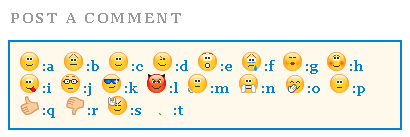
Note:- To change the appearance of the rectangular block simply edit the code in bolded green colour
5.. Now find </body> and paste the code below just above </body>
Note:- You can also try adding the code below just above </head> instead.
<script type='text/javascript'>
//<![CDATA[
a = document.getElementById('comments');
if(a) {
b = a.getElementsByTagName("DD");
for(i=0; i < b.length; i++) {
if (b.item(i).getAttribute('CLASS') == 'Author-comment-body' , 'comment-body') {
_str = b.item(i).innerHTML.replace(/:j/gi, "<img src='https://blogger.googleusercontent.com/img/b/R29vZ2xl/AVvXsEg7j6DrP30eOzpWH3g3g9BpkG9i8I5p4pzDXH20g2bWx00W4xzfJNiNPK9VQ2zZNBWBbOaOZV-id2O2mQ2ViE4lqB_nUwwqb2I_XPeiRW0RLWG3uZ9eRZII-_Vhk9S32QGull0pf377Gv0/s800/emoticon-0126-nerd.gif' alt='' class='smiley'/>");
_str = _str.replace(/:k/gi, "<img src='https://blogger.googleusercontent.com/img/b/R29vZ2xl/AVvXsEiysGhTYNNLhSP926ODJpwDANFRFCIwwLWCR7XKj1Q1qNuCmfMt9uDNFXrd_ZyeGjkvptDcPCv67tq5w0_805rIRbjzlOruYN4jeDGq0xflDVoQYlmDbC1XRkFr2BP8IOShnrn7kBb3sdE/s800/emoticon-0103-cool.gif' alt='' class='smiley'/>");
_str = _str.replace(/:l/gi, "<img src='https://blogger.googleusercontent.com/img/b/R29vZ2xl/AVvXsEgJ36h7bFsz6U_oENGHE9dFtaPQ1W8zf9cIEUeChha82ipDsAxVxWfyS51vdR6kCvwvKGNU97rU2EQngUdEfMuCFpi5TkJn0s4mZmw3gsD7Q3KB5JjtL_l20h7oAiIjjb6GJHIMpHD3KXE/s800/emoticon-0130-devil.gif' alt='' class='smiley'/>");
_str = _str.replace(/:m/gi, "<img src='https://blogger.googleusercontent.com/img/b/R29vZ2xl/AVvXsEjgDIERzsKxgiWiwSGu9Z3_OoHcaoYIn_41uZwEPHDRfz7I7605OvR4I_pSrejPAY3_DdFkUZobepJNZHHEttS0O6U1XH3q-a9BHNKQmIjt0UTE0H-d6OJM3NLK4vrvKVqvWEgyU0aZDes/s800/emoticon-0133-wait.gif' alt='' class='smiley'/>");
_str = _str.replace(/:n/gi, "<img src='https://blogger.googleusercontent.com/img/b/R29vZ2xl/AVvXsEiqoqunK_H6HpeKePu7H-oc_B4gQQqfdIu0qqBzr9wIMJe9LnB7ryYYIAKIdsCuNc7KFyL0R-KTr8yryLCauEXzdFS8NkbpcWqs_SvZS1Xz-eY8vGd6yvNQ8vqmCXzzWBCpHk8JH9e5f6w/s800/emoticon-0137-clapping.gif' alt='' class='smiley'/>");
_str = _str.replace(/:o/gi, "<img src='https://blogger.googleusercontent.com/img/b/R29vZ2xl/AVvXsEiuaxAi0gSmw_BfmIESF3_xe1k8iywQA_chFyFBJoHM8UcnAvdwX6fpLsTgHtgKrc6fHGEhc0ER35Mz0Za9pwBsdH66J6Q8HkeR5rTThJunMnmHWlD585-TGqKGSc1j7RRdDVUBIJp95EA/s800/emoticon-0136-giggle.gif' alt='' class='smiley'/>");
_str = _str.replace(/:p/gi, "<img src='https://blogger.googleusercontent.com/img/b/R29vZ2xl/AVvXsEht3kb02PJLv4E7T62CErfdJnsjtQvEGZL8nNFuy35Q6FIz4UAlzOeYGNQm-GbbBPS9QQQTctC3yeV6yjAFN8fT8pWQBqICsVUNCcJsbuYer90x1h4Lj-kVpUDr33XThI5jNfA0kJT_zJA/s800/emoticon-0141-whew.gif' alt='' class='smiley'/>");
_str = _str.replace(/:q/gi, "<img src='https://blogger.googleusercontent.com/img/b/R29vZ2xl/AVvXsEiticwqwtprIV0rFakv-b8xPKcIxv1ZmupyFEGOMHmWlz2oIhMYeSRSn1mATTrHSegcoTgEGEjP0Fj5ld2H2GRxOREey-9GpcupNRjFhA9gq7TSFgkso3YNix2kdquayvUWReWc8c0rT80/s800/emoticon-0148-yes.gif' alt='' class='smiley'/>");
_str = _str.replace(/:r/gi, "<img src='https://blogger.googleusercontent.com/img/b/R29vZ2xl/AVvXsEjRZtacoOzWQOHd2XEaS2X6g07rk50WdLrQFl8LepJEzb0edlWPnuLpfR5Cie9IQpLXVFGlnDkiXeMEiQxl3DpKyZ84zekJJinLntUtvLhCDxcIQ1NPj2sz1-a9masTnpsPPliMDG8YieU/s800/emoticon-0149-no.gif' alt='' class='smiley'/>");
_str = _str.replace(/:s/gi, "<img src='https://blogger.googleusercontent.com/img/b/R29vZ2xl/AVvXsEjaypsanw_95VYOzKhd3nXXsNDxoaEH3i9lIh7DAgkDYZwFKdSfSn7yT4z60zZJevgdkfPABNtlqCc-6Tjd6oESGZvc8S1wrnwEs0vHlL9EEPlIE81CS8F4DK62UZqRZjaepDuQlMXOEBQ/s800/emoticon-0155-flower.gif' alt='' class='smiley'/>");
_str = _str.replace(/:t/gi, "<img src='https://blogger.googleusercontent.com/img/b/R29vZ2xl/AVvXsEjst74Ek5inMCkfDAe6WfCQH1IowqZsO9ufQgh9fx14Or1tDwOe58dh6p7zanN9o3sCoysdfTM0Rx7oKWCRJXQjNVqdXKaopc3V7qTJeZh2RYvM1UUMOU6dMTw3crcvKhFc2fyPMGfp_wI/s800/emoticon-0178-rock.gif' alt='' class='smiley'/>");
_str = _str.replace(/:a/gi, "<img src='https://blogger.googleusercontent.com/img/b/R29vZ2xl/AVvXsEi1eFmz9eqSJXMVM9jT50A4JptAYoedjzIAAHW0b1SjFK4AqSHzMW12BqTl-AvbvfPgKca0aa29zKp0-T9BneC7mKdt3w-dBDPckrKC23Hza5plb8g_7pauqFBg2GvbuYGMWvvwWzeLk24/s800/emoticon-0100-smile.gif' alt='' class='smiley'/>");
_str = _str.replace(/:b/gi, "<img src='https://blogger.googleusercontent.com/img/b/R29vZ2xl/AVvXsEgkwZa7_S4jZa9dWMVldTw5cx7ZEnsxI2ZyD1aaHukIi2PbjeoW_3aiBUqO5ETNWFL24Vktm-JgwBXhUzfRCJB4vysdpeXfN_B5zU4ZgQrZ8_wmTDtygp0JgfyO87HOnc7L0QbXaJOEEH0/s800/emoticon-0101-sadsmile.gif' alt='' class='smiley'/>");
_str = _str.replace(/:c/gi, "<img src='https://blogger.googleusercontent.com/img/b/R29vZ2xl/AVvXsEjzSaZDWMJsjhstcmvm0_vKaUkMSH2S7PNcPe783lMHuZs58wps7ySiWdXa3v7FqmReXdq35Efwa1l4um6dOrTneF4sjF0wqZvtqvwoiIsFweHiIkdrZKJLvkDPmcq9ulHA3fTUeEyFSbk/s800/emoticon-0102-bigsmile.gif' alt='' class='smiley'/>");
_str = _str.replace(/:d/gi, "<img src='https://blogger.googleusercontent.com/img/b/R29vZ2xl/AVvXsEitfUP5lwYISawQdBfAA76JcDAcv_CQYlZcVQ8ItKahTwysIMIgG0R_Y85zy78kCiZlMY9iuu0rFSBOIH1hjX1iflil97GR5WWh09RMTg1J51OQrJL871OtP0Evp_cDuR5_HzRfW9lFk_Y/s800/emoticon-0105-wink.gif' alt='' class='smiley'/>");
_str = _str.replace(/:e/gi, "<img src='https://blogger.googleusercontent.com/img/b/R29vZ2xl/AVvXsEgL-Y077QZkrxnprvHY5OeiKVNLFmPq_vFIk7H2og_jKAoN20SMP75GpHV2ZDpzvcVFPWu-ZP3ZW_tFe84msUGHXhbHaWHc6Nd2xw4xdlmuE1lkA8-iWsWeqEU_UbCt7xqefHnewpZGjhU/s800/emoticon-0104-surprised.gif' alt='' class='smiley'/>");
_str = _str.replace(/:f/gi, "<img src='https://blogger.googleusercontent.com/img/b/R29vZ2xl/AVvXsEjs2LUWT125FombGyA55uf2B8R3ihjVs04m333SoqMzTkr3B8_1hGouKF060PVylZ7eFeXIHvSEdztj0FCQZJkPK_LP1axRs0La5cJ2XibjGAuIGNUTLK9tS2udGxJPdv3aJa98G00-KS4/s800/emoticon-0106-crying.gif' alt='' class='smiley'/>");
_str = _str.replace(/:g/gi, "<img src='https://blogger.googleusercontent.com/img/b/R29vZ2xl/AVvXsEhZyLqNVvEc0LVxE_7e_bS5U5X6aaHRxKe-Ozw-XK_jJFxYu1_Sd_w9VJdZI19QFYqdX4HWAG734KwmmctGPFXk1pJSUceirHCMk_CRaemEXrjoTD50cr0p8cp9fIb6idk1sYenNstAsUo/s800/emoticon-0109-kiss.gif' alt='' class='smiley'/>");
_str = _str.replace(/:h/gi, "<img src='https://blogger.googleusercontent.com/img/b/R29vZ2xl/AVvXsEhjHmMY58YaTYE1ziZcQeXNmE0CC3dxaQvYd-Yks-Mhxqzm57WlhRPZGzdt5hdCmbc-pmeqHoIFpIqEH8YssNqUMGks9fYYfemoHG7GffWNQxP-NeF_y9_GKuy6hELXcroXg05PY3Ncujk/s800/emoticon-0111-blush.gif' alt='' class='smiley'/>");
_str = _str.replace(/:i/ig,"<img src='https://blogger.googleusercontent.com/img/b/R29vZ2xl/AVvXsEgb_kd-SHPiI-_-DAwbj3L5atf-sT38727G77dOCKgWGNh1R87ps_7mF2IYxrlYNGH7OZrO9968HPqOP8e1i5niuslR6Zi2VvwEJWlv-VWKBzUPZE04aCViEKut_KMYwHzzO-08KRnnUS4/s800/emoticon-0110-tongueout.gif' alt='' class='smiley'/>")
b.item(i).innerHTML = _str;
}
}
}
//]]>
</script>
6. Save your template and view the beautiful change! :D
The Emoticons Will appear In Both Readers and Author’s Comments!
As you know the yahoo smileys tutorials has one disadvantage and that is that the emoticons appear only in readers comments and can not be displayed in author comments. In order to make the emoticons appear even in Authors comment block then simply replace the code in bolded red colour above (i.e Author-comment-body ) with the CSS class for blog owners customized comments. If you do not know how to do it then simply share your blog URL and I will let you know what code should you paste instead of Author-comment-body
How did you find it?
I made it as simple as it could be and I hope it will add an extra sweet flavor to your blogs. The codes for the emoticons are made easy so that readers could easily use an emoticon of their choice. You can increase the number of emoticons and can also customize the look and feel of the rectangular box of emoticons that will appear above the comment form. I wrote this in hurry so if you have any questions just drop me a hi! :>>Saturday, July 2, 2011

“We have been working with Accumulate and their Mobile Everywhere platform for a long time and we are convinced that it is the right solution for enabling secure and easy to use mobile payments”, says Raymond Klavestad, CEO of PayEx Solutions.
First out is SMS Premium payments like for ticketing, music and purchase of goods in vending machines and person-to-person money transfer. The solution provided by Accumulate can easily enable more payment options and other mobile services, and this without having the end user to re-download, re-install and reactivate their mobile application. The service is from start available on all major mobile platforms.
Organizations that want to offer mobile financial services to its customers can with the mobile security platform from Accumulate enable secure and easy to use services like:
- Mobile payments – POS (incl. NFC payments), person-to-person, online, vending machines, remittance, etc.
- Mobile banking – full mobile channel to all informational and transactional services.
- Other services – examples; ticketing, coupons, loyalty and membership points
- Online card transactions – example is using the mobile for 3D Secure.
Accumulate is a leading provider of secure online solutions for mobile. The company’s patented technology offers solutions such as mobile financial services and security services using your mobile for secure authentication, login and electronic signing.
Saturday, July 2, 2011 0
Thursday, June 30, 2011
 Reliance Mobile, India’s largest dual technology operator had brought out a new offer for Bihar and Jharkhand circle wherein customers can enjoy upto 2GB of data at blazing speeds of upto 7.2MBPS with their 3G modem.
Reliance NetConnect customers can recharge with Rs98 which will allow them a data transfer of upto 2GB and will be valid for 1 day only.
That means if a customer recharges his/her Reliance NetConect dongle with Rs98 today, he/she can enjoy 2GB data for the same day itself till 23:59hrs.
The plan has been summarized below:
MRP | Benefit | Validity |
Rs 98 | 2 GB | 1 day |
Offer valid for Bihar and Jharkhand circle only. T & C Apply.
Thursday, June 30, 2011 0
Monday, June 27, 2011
Mozilla launched Firefox 5 today. Firefox 5 is available for download @ mozilla's ftp server. The new firefox 5 beta is coming up with some new features.You can download it from the below link.


download firefox 5 beta firefox 5 mac firefox 5 linux download
Monday, June 27, 2011 0
Sunday, June 26, 2011
 I shared a tutorial yesterday on 14 amazing ways to stylize Blogger Blockquote and today I have a really interesting and exceptional blockquote for those who write tutorial based articles on their blogs and websites. I have created two blockquotes, the first one has no number list while the second one comes with automatic number list and looks like your notebook diary. The number list starts at #1 and end at #112. Both of these blockquotes can easily be customized to suit your web layout.
 So let’s have a look at each one of them first.
Blockquote With Auto Number List:

Blockquote Without Number List:

Liked the difference? Now let’s learn how to add each one of them to your Blogger Blogs.
Adding Blockquote With Auto Number List To Blogger
To add this blockquote to blogger, follow the simple steps below,- Go to Blogger > Layout > Edit HTML
- Backup your template
- Search for .post blockquote and delete it along with all its occurrences. In most templates the codes look like this,
.post-body blockquote { line-height:1.3em; }
If you couldn’t find such code then it is OK.
OR
.post blockquote{ bla bla bla} - Now search for ]]></b:skin> and just above ]]></b:skin> , paste the code below,
blockquote {Customization:-
background: #fff url(https://blogger.googleusercontent.com/img/b/R29vZ2xl/AVvXsEjdYiA_adSbYeiiY_sFUjm9Wa_Ch2ajy2kp6O4ib9otV-EVDkjcJK_K6EVpsCMMUY5Mn8oDaKyWgEGzR6INsvV00xBvziRIrw73pyILuY09jb1QRn3JjoZ4nKIweyO9m1JdeahwDfkWqH0/s1600/notebook-with-numbers.gif) repeat-y;
margin: 0 20px;
padding: 0px 20px 5px 55px;
color:#7a7a7a;
font: bold 0.9em "Comic Sans MS", verdana;
line-height: 153%;
}
blockquote p {
margin: 0;
}
You can also change the Number list background by replacing the bolded image link in the code above with the image URLs of one of these blockquotes.
Tip:- Right Click the links below each blockquote and choose Save Link As Or Copy Link Location to its image URL.
font :- It includes font style, size and type respectively. Match the colours with the code above for reference. Font style can be bold, normal , italic or bold italic


color :- This refers to text colour. You can use a different font colour using our color chart
Adding Blockquote With No Number List To Blogger
To add this blockquote simply follow the same steps as shared for the blockquote with auto number list. But for step#4 paste the code below instead,blockquote {You can replace the Background Image link with one of these.
background: #fff url(https://blogger.googleusercontent.com/img/b/R29vZ2xl/AVvXsEgxv0X6y1SjN9XS6GhJuIILp_lBcJhddCl0dfyNE8dG66NxK5RGHTo0jVOZVKIZvJhsYQmp0tDPnOoM3vZIO-kloLT6ldLvD7Hxy1D3A3fK1PUMipiYl1MVuuty6-6SIZGHmw-jxPcG5UQ/s400/notebook.gif) repeat-y ;
margin: 0 20px;
padding: 20px 20px 20px 55px;
color:#7A7A7A;
font: bold 0.9em "Comic Sans MS", verdana;
line-height: 155%
}
blockquote p {
margin: 0;
}
Tip:- Right Click any of the blockquote images below and choose Save Link As Or Copy Link Location to get its image URL.


That’s All!
Note:- If you want to increase the number range for the blockquote with auto number list or if you want to create an image with your custom colours than I can provide you the PDF source file for it. But it will be given to subscribers only. If you haven’t subscribed yet, kindly do so to avail unlimited download resources from us to you.Let me know how was this new discovery :)
Sunday, June 26, 2011 6
Subscribe to:
Posts (Atom)


