
Showing posts with label webmaster. Show all posts
Showing posts with label webmaster. Show all posts
Saturday, July 9, 2011
 BuySellAds is a name that is known to all. It is an advertisement service where you can buy and sell ads out of thousands of blogs and websites. Ads are displayed in different format sizes, the most popular being 125 by 125 and 468 by 60 and 300 by 250. By default the empty Ad Posts look dull and grey in color just like these,

I am sure no one would like the default look so lets play with some CSS!
Customizing BSA Ad Spots
Whether you are a blogger user or wordpress or a webpage holder, this tutorial works for all. We just need to add the CSS code to our style sheet and that's it. So follow up,- Go To Blogger > Design > Edit HTML
- Backup your template
- Search for
- and just above paste the code below,
.adhere{ background:#ffffff !important; border-color:#B7DBFF !important; }5. Save your template and you are done!
.adhere:hover{ background:#EAF5FF !important; }
View your webpage to see your Ad spots with a more attractive look as shown below,
Active Mode Look:

Mouse Hover Look:

You can observe clearly how the ad spot changes color when the mouse cursor is hovered on it. So lets customize the colors.
Make these changes,
- To Change the border color, kindly change #B7DBFF . Our Color Generator tool or Color Chart can be helpful.
- To Change background color in active mode, kindly change #ffffff
- To change background color in Mouse Hover mode, kindly change #EAF5FF
That's All! :>
PS: To change the Advertise Here font style and color. Kindly edit it from your BSA account.Saturday, July 9, 2011 0
 CSS is a fun thing to play with. With the growing development of cascading style sheet and with the accepting compatibility of new browsers, web designing is becoming more and more creative. We once used Photoshop to manually add drop shadows to images but now thanks to CSS3 you can add drop shadows to all your images automatically. We will learn today how to minimize the size of large images and how can we make them expand to their original size on mouse hover. I am sure you will love it :)
Please see a demo first,
How To add Drop Shadows and Enlarge Images on Mouse Hover?
The methods are really simple.- Go to Blogger > Design > Edit HTML
- Back up your template
- Search for ]]></b:skin>
- Just above ]]></b:skin> paste the following code,
.MBT-CSS3 img{
-webkit-transform:scale(0.7); /*Webkit 0.7 times the original Image size*/
-moz-transform:scale(0.7); /*Mozilla 0.7 times the original Image size*/
-o-transform:scale(0.7); /*Opera 0.7 times the original Image size*/
-webkit-transition-duration: 0.5s; /*Webkit: Animation duration*/
-moz-transition-duration: 0.5s; /*Mozilla Animation duration*/
-o-transition-duration: 0.5s; /*Opera Animation duration*/
opacity: 0.5;
margin: 0 10px 5px 0;
}
.MBT-CSS3 img:hover{
-webkit-transform:scale(1.1); /*Webkit: 0.5 times the original Image size*/
-moz-transform:scale(1.1); /*Mozilla 0.5 times the original Image size*/
-o-transform:scale(1.1); /*Opera 0.5 times the original Image size*/
box-shadow:0px 0px 30px gray;
-webkit-box-shadow:0px 0px 30px gray;
-moz-box-shadow:0px 0px 30px gray;
opacity: 1;
}
If you wish to further decrease the image size then decrease 0.7 or if you wish to further fade the image then decrease 0.5
You are almost done. Now when ever you want the image to appear with this effect, simply use this code,
<div class="MBT-CSS3">Upload your image to Blogger editor and replace Image URL Goes Here with your image link. You are done. Now visit your blog to see the effect working in action and yell out Bravo! :P
<img src="Image URL Goes Here" />
</div>
If you wish to add this effect to another image just keep on adding <img src="Image URL Goes Here" /> before </div>
This effect is compatible with latest versions of Mozilla, Safari, Opera, Chrome and as usual not that effective with boring IE. I just hope you liked it.
Thursday, July 7, 2011
 Its really important to keep everything as attractive as possible while writing posts. Text Area boxes are a useful method of showing long bunch of text or code on your blog. Just last month I wrote two posts 25 Vertical Navigation Menus and 30 Horizontal Navigation Menus where I have used a lot of coding and all those coding were displayed inside fully customized text areas that made the post looked clean and neat. Text boxes are good only if there length and height is well controlled and today with this tutorial we will learn several ways of styling our default text areas.
Kindly see a demo first,
Before

After

How to Customize the Text Area Box?
To do this follow the steps below,- Go to Blogger > Layout > Edit HTML
- Search for </b:skin>
- And just above it paste the code below,
.mbt-textarea {4. Finally save your template!
padding:0;
margin:0;
background: #fff;
width:400px;
height:40px;
color:#666;
font:12px arial;
border:1px dotted #289728; }
.mbt-textarea:hover {
color:#289728;
border:2px solid #666;
}
How to show the Stylized Text Area Effect inside Blogger Posts?
To display this customized text area you only need to add the following code in the Edit HTML section of your Blogger Editor,<textarea class="mbt-textarea" readonly="readonly">WRITE-TEXT-HERE</textarea>
Simply replace WRITE-TEXT-HERE with your text that you want to appear inside a box.
How to Customize The CSS of The Text Box?
If you wish to change the font, color or in short the entire look of the text box then you just need to edit the following areas in the CSS code above,background: #fff; –> This Changes background color of the text area
width:400px; –> This changes width size of box
height:40px; -> This changes box height
color:#666; -> This changes font color inside text box
font:12px arial; –> This changes font size and font family respectively
border:1px dotted #289728; } –> This changes the border size, style (i.e dotted, solid, dashed) and color. Editing it will change the look of the border/outline across the text
.mbt-textarea:hover {
color:#289728; –> This changes font color on mouse hover
border:2px solid #666; -> This changes border size, style and color on mouse hover
Thursday, July 7, 2011 0
Tuesday, July 5, 2011
 WordPress receives a lot of love from the blogging community, but Blogger.com is still a perfectly viable blogging platform for the majority of people.
In an effort to help those devoted Blogger users, we’ve gathered up the best of our lists about tools, themes and shortcuts for your preferred platform. Take a look through and you are sure to find something that will help you, even if you didn’t know you were looking for it!
Tell us what you think of these and any we might have missed, and let us know about your Blogger blog in the comments.
Free Template Resources

AllBlogTools.com – A collection of over 100 templates from an assortment of a lot of smaller designers. You can look them up by layout, color, subject matter and so on.
Blogger-Templates.Blogspot.com – Keeps a small selection of top-notch Blogger themes up and running.
Blogger-Templates.Deceblog.net – A small selection of unique themes for Blogger accounts.
Blogger-Templates-Directory.Blogspot.com – A large directory of Blogger templates, links to resources for further development and a whole lot more.
BloggerTemplates.org – Doesn’t seem to have been updated since it originally launched, but all of the templates still work, and have a lot of resemblance to WordPress themes.
BlogspotTemplates.Blogspot.com – Several pages of Blogger templates with tips on how to use them.
BlogspotTemplate.com – Right around 100 templates for Blogger of varying styles and colors.
BlogTemplates.Noipo.org – A small selection of graphical and text based templates for your blog.

Carl Galloway’s Blogger Templates – A small selection of some fairly unique templates that haven’t been updated in some time, but are still fully functional.
FinalSense.com – Offers over 300 templates for your Blogger account. Have just about every theme and color combination that you can think of.
FreeBlogger-Templates.Blogspot.com – Focuses heavily on simplified Blogger templates that make for the easiest reading possible.
FreeTemplates.Blogspot.coms – A blog dedicated to bringing you nothing but free Blogger templates. Nicely categorized, and easy to browse.
FreshBloggerTemplates.Blogspot.com – It has been a while since this site released any new templates, but their designs are very clean and still in working order.

GoSuBlogger.com – A large selection of free templates that mix original work with converted WordPress themes.
Isnaini.com – A large and varied collection of templates for use on Blogger, along with a detailed tutorial on how to properly insert them into your account.
JackBook.com – Besides offering a large selection of free templates, with a heavy saturation of video game inspired themes, JackBook also offers tips and pointers on better SEO for your blog.
OurBlogTemplates.com – An odd mix of nearly 200 free templates for you to use and with a dash of reviews of DSLR cameras.
PannaSmontana Templates – Numerous free templates for Blogger, but the site is entirely in Italian. Thankfully it is well designed and you can find your way around.
Public-Template.Blogspot.com – Features a mixture of free templates for you to download, tutorials on how to make your own, and admiration for templates they enjoy.
Simple-Blogskins.Blogspot.com – Offers a handful of free skins for your Blogger account.
Template-Godown.com – A site specializing in converting WordPress themes to the Blogger friendly XML format.
WP-Themes.us – Yes, the name points to them being all about WordPress themes, but they also provide a nice selection of free templates for Blogger.
Yanku-Template.Blogspot.com – Offers some very slick looking, free, Blogger templates of the 2 and 3-column varieties.
Premium Template Resources

PaperbackDesigns.Blogspot.com – Offers free themes and sidebar badges in addition to doing custom designed templates for a fee.
SuckMyLolly.com – A mixture of free and premium themes for your Blogger account. Very colorful in design and lacking the traditional Blogger look.
Tips & Tricks for Template Design

PhotoshopSupport.com – Tips for designing your own Blogger template, using Photoshop.
Fresh and Modern Blogger Templates
Aspire – A rustic look and calendar in the sidebar make this blog template perfect for history bloggers and traditional food bloggers.Cat – Glossy, shiny; great for a web 2.0 centric blog.

Erudite – I love the templates at this site. This particular one is very clean and can be easily customized.

Flower Pink Border – If you’re up for something different, try this combination of black and pink.
Gemstone – Very nice use of the header area and a good color combination.
Genesis – A three-column dark color theme with nice header tabs and sidebar header buttons.
Glass – Another personal favorite of mine, creates that “wow” effect right from the start.
GossipCity – A three column template that will give your blog that metro look with stars and shines.
History channel – A template based on the History Channel.

Leia – A popular template in three column. There are header tabs, and a big blog description space on the right-hand side.

Mosaico – A template design in mosaic style.
Navideno – A eye appealing treat with a fruity flavor.
O2 – This is a popular WordPress template ported to Blogger. It is a three column template with a bigger sidebar on top of two mini bars on the right hand side.
Rainbow Garden - Would you like to have your post decorated nicely with the garden flowers? This is the template for you then.
Red Girl – Quite a nice theme with a red background and an unusual style. You can put your picture in the header.
Bloggerized AdSense – AdSense-ready template, not too shabby looking.
iPlantilla – Another Mac-themed template with a very clean look.
Secret – Nice hand drawings. And quite a unique design that is definitely striking.

Styleicious – A nice color combination again with blue and black on this three column template.
Terra Firma – A nice WordPress ported blog with space for Adsense in the header. Orange and green combination makes it looks fresh and bright.
1024px – A simple two column template on plain white background without much color, but with great readability.
Beautiful Blogger Templates
2-column templates
Andreas02 – Lots of tab links above the header. You can showcase the description of each active tab on the header.
Agua – A minimalistic, clean template giving a pure white look.
Cajas – A blog title in a header that looks like the Blogger navbar and five menu links with multi-color backgrounds that take the place of the traditional blog header.
Colibri – This reminds you of a garden, doesn’t it?
Dead – This one can be described as heavy metal/rock style – sinister and dark.
Eclipse – Another dark theme that brings werewolves to mind. An enchanting template for the dark souls.
Emire – Beautiful color combination but I wish there was more width for the post and the sidebar.

Integral – The most striking visual details on this template are its rounded header and the green and sky-blue color combination.
K2 – A popular WordPress theme cloned for Blogger.
Minyx – A template that looks like an invitation card. Good use of space in the header.
Natural – If you are the artistic kind, this one will be a feast for your eyes.
Neoneon – This is another unique design – rectangular sidebar boxes and spiral main body.
S08 – A blue color body on a darker blue background – you might have thought it wouldn’t work, but here it is.
Vertical – As the name suggests, this is a vertically designed clean template. You might want to throw in some more code and utilize the space below the blog title better.
3-column templates
Andreas4 – Another popular WordPress template by Andreas cloned for Blogger. The template can be used as a bare bone structure for customization.
Butterfly Magic – Another beautiful color combination, or shall we call it just another butterfly effect :-)
Columnas – This theme’s peculiar design stands out from the rest of the templates in this list. Nice and clean.
Cultivado – Neat, floral, elegant – this one’s perfect for writing on life, philosophy, thoughts, poetry, love and the like.

Erudite – A neat three-column Blogger template with the black color header and the orange color RSS icon gelling well.
Green Marinee – A long time favorite of many bloggers ported to Blogger. Great use of space, and a nice color combination.
Hemingway – A beautiful dark template – one column for the post body and three column on the footer.
Illacrimo – A beautiful clone for Blogger from the WordPress theme Illacrimo, though I feel there should be a way to use more space currently taken by the date-display on the left of the screen.
Informativo – A similar template to the Columnas template above but with the header, for the less-unconventional bloggers who wants to stick with the proven.
Minimalista – Another great port from WordPress to Blogger.

Pizza – Don’t be dissuaded by the pizza theme if you are thinking of using this for a different subject blog. The template is highly customizable. The unique element in this template is the header which has been divided into two parts. You can display your blog logo or title on the left-side header box while using the other box for whatever you like.
Pro – A different looking search box, menu links above the blog title, and the graduated blue header background in a unique design makes this template unique.
Puerto – Somehow this template makes the post body look grand and majestic.
The Hobbit – If you are a fan of Tolkien, this one is for you.
Neo – A 3 column template that reloads in parts allowing faster reading and surfing.

4-column templates
Neosapian – The contrast between black and red is striking. The second right-hand sidebar can be widened further and the red header can be used subtly for ads or to display more information. You decide whether to change the current header image or not :-)Qwilm – A simple looking great design that can be customized to a great extent.
Unique Blogger Templates

Dream Light – Artistic and in your face, but maintains readability with ease.
Fly Net 02 – A very business-like template that gives you a 4-column header for information as well as a flash intro – if you want it.
iBlock – Versions of this template are available just for the iPhone/iPod Touch or you can keep the feel for a normal browser if you like.
Night Club – Made for actual nightclubs, but easily changed. Great for music enthusiasts, DJs, party promoters and more. It’s rare to see a black theme for any blogging platform that is actually readable, and this one handles it beautifully.
Nyoba – Nyoba gives you three columns as well as two Google AdSense units in prime locations, with an easy to change header image.

The Girl – Available in multiple colors with different headers, it very much has a “WordPress feel” to it. If you prefer the convenience of Blogger, this would be a good theme for you to merge the two.
TotuliPink – Pink templates tend to be loud and hard on the retinas, but this one works quite well without making you want to run for the hills.
Miscellaneous Blogger Tools

Back up your Blogger Blog – A comprehensive tutorial regarding the backup of your Blogger data.
Blogger Status – Stay up-to-date with the latest Blogger updates and so-on with the official Blogger blog.
Google Macintosh Dashboard Widgets – A quick way to post to your blog via the OS X dashboard.
HaloScan – Integrate trackbacks into Blogger.
w.bloggar – Windows application for integration with your blog, which includes several features web-based editors don’t offer. Manage various Blogger accounts efficiently.
230+ Keyboard Shortcuts for Top Web Services
These shortcuts work when editing posts:control + b – BoldFor more keyboard shortcut commands, see the Official list of Blogger shortcuts.
control + i – Italic
control + l – Blockquote (when in HTML – mode only)
control + z – Undo
control + y – Redo
control + shift + a – Link
control + shift + p – Preview
control + d – Save as Draft
control + p – Publish Post
control + s – Autosave and keep editing
control + g – Hindi transliteration
Post Source: http://mashable.com/2009/01/16/blogger-toolbox/
Tuesday, July 5, 2011 0
Monday, July 4, 2011
 Many tutorials have already been published on how to display emoticons in BlogSpot comments but since unique content is what MBT always publishes, today we will learn on how to add a collection of cute Skype emoticons above Blogger comment form. The tutorial is as easy to understand as you can imagine! :)
Kindly have a look at the demo first,
Follow These Steps:
- Go to Blogger > Layout > Edit HTML
- Check the “Expand Widget Templates” box
- Search for,
<h4 id='comment-post-message'><data:postCommentMsg/></h4>4. Just below it paste the code below,
<div style=' width: 370px; text-align: left; border: 2px solid #0084ce; background: #FEF9EA; padding: 10px; color:#0084ce; font-weight:bold; '>Save your template and view your blog to see a rectangular block of emoticons as shown below,
<img border='0' src='https://blogger.googleusercontent.com/img/b/R29vZ2xl/AVvXsEi1eFmz9eqSJXMVM9jT50A4JptAYoedjzIAAHW0b1SjFK4AqSHzMW12BqTl-AvbvfPgKca0aa29zKp0-T9BneC7mKdt3w-dBDPckrKC23Hza5plb8g_7pauqFBg2GvbuYGMWvvwWzeLk24/s800/emoticon-0100-smile.gif'/> :a
 
<img border='0' src='https://blogger.googleusercontent.com/img/b/R29vZ2xl/AVvXsEgkwZa7_S4jZa9dWMVldTw5cx7ZEnsxI2ZyD1aaHukIi2PbjeoW_3aiBUqO5ETNWFL24Vktm-JgwBXhUzfRCJB4vysdpeXfN_B5zU4ZgQrZ8_wmTDtygp0JgfyO87HOnc7L0QbXaJOEEH0/s800/emoticon-0101-sadsmile.gif'/> :b
 
<img border='0' src='https://blogger.googleusercontent.com/img/b/R29vZ2xl/AVvXsEjzSaZDWMJsjhstcmvm0_vKaUkMSH2S7PNcPe783lMHuZs58wps7ySiWdXa3v7FqmReXdq35Efwa1l4um6dOrTneF4sjF0wqZvtqvwoiIsFweHiIkdrZKJLvkDPmcq9ulHA3fTUeEyFSbk/s800/emoticon-0102-bigsmile.gif'/> :c
 
<img border='0' src='https://blogger.googleusercontent.com/img/b/R29vZ2xl/AVvXsEitfUP5lwYISawQdBfAA76JcDAcv_CQYlZcVQ8ItKahTwysIMIgG0R_Y85zy78kCiZlMY9iuu0rFSBOIH1hjX1iflil97GR5WWh09RMTg1J51OQrJL871OtP0Evp_cDuR5_HzRfW9lFk_Y/s800/emoticon-0105-wink.gif'/> :d
 
<img border='0' src='https://blogger.googleusercontent.com/img/b/R29vZ2xl/AVvXsEgL-Y077QZkrxnprvHY5OeiKVNLFmPq_vFIk7H2og_jKAoN20SMP75GpHV2ZDpzvcVFPWu-ZP3ZW_tFe84msUGHXhbHaWHc6Nd2xw4xdlmuE1lkA8-iWsWeqEU_UbCt7xqefHnewpZGjhU/s800/emoticon-0104-surprised.gif'/> :e
 
<img border='0' src='https://blogger.googleusercontent.com/img/b/R29vZ2xl/AVvXsEjs2LUWT125FombGyA55uf2B8R3ihjVs04m333SoqMzTkr3B8_1hGouKF060PVylZ7eFeXIHvSEdztj0FCQZJkPK_LP1axRs0La5cJ2XibjGAuIGNUTLK9tS2udGxJPdv3aJa98G00-KS4/s800/emoticon-0106-crying.gif'/> :f
 
<img border='0' src='https://blogger.googleusercontent.com/img/b/R29vZ2xl/AVvXsEhZyLqNVvEc0LVxE_7e_bS5U5X6aaHRxKe-Ozw-XK_jJFxYu1_Sd_w9VJdZI19QFYqdX4HWAG734KwmmctGPFXk1pJSUceirHCMk_CRaemEXrjoTD50cr0p8cp9fIb6idk1sYenNstAsUo/s800/emoticon-0109-kiss.gif'/> :g
 
<img border='0' src='https://blogger.googleusercontent.com/img/b/R29vZ2xl/AVvXsEhjHmMY58YaTYE1ziZcQeXNmE0CC3dxaQvYd-Yks-Mhxqzm57WlhRPZGzdt5hdCmbc-pmeqHoIFpIqEH8YssNqUMGks9fYYfemoHG7GffWNQxP-NeF_y9_GKuy6hELXcroXg05PY3Ncujk/s800/emoticon-0111-blush.gif'/> :h
 
<img border='0' src='https://blogger.googleusercontent.com/img/b/R29vZ2xl/AVvXsEgb_kd-SHPiI-_-DAwbj3L5atf-sT38727G77dOCKgWGNh1R87ps_7mF2IYxrlYNGH7OZrO9968HPqOP8e1i5niuslR6Zi2VvwEJWlv-VWKBzUPZE04aCViEKut_KMYwHzzO-08KRnnUS4/s800/emoticon-0110-tongueout.gif'/> :i
 
<img border='0' src='https://blogger.googleusercontent.com/img/b/R29vZ2xl/AVvXsEg7j6DrP30eOzpWH3g3g9BpkG9i8I5p4pzDXH20g2bWx00W4xzfJNiNPK9VQ2zZNBWBbOaOZV-id2O2mQ2ViE4lqB_nUwwqb2I_XPeiRW0RLWG3uZ9eRZII-_Vhk9S32QGull0pf377Gv0/s800/emoticon-0126-nerd.gif'/> :j
 
<img border='0' src='https://blogger.googleusercontent.com/img/b/R29vZ2xl/AVvXsEiysGhTYNNLhSP926ODJpwDANFRFCIwwLWCR7XKj1Q1qNuCmfMt9uDNFXrd_ZyeGjkvptDcPCv67tq5w0_805rIRbjzlOruYN4jeDGq0xflDVoQYlmDbC1XRkFr2BP8IOShnrn7kBb3sdE/s800/emoticon-0103-cool.gif'/> :k
 
<img border='0' src='https://blogger.googleusercontent.com/img/b/R29vZ2xl/AVvXsEgJ36h7bFsz6U_oENGHE9dFtaPQ1W8zf9cIEUeChha82ipDsAxVxWfyS51vdR6kCvwvKGNU97rU2EQngUdEfMuCFpi5TkJn0s4mZmw3gsD7Q3KB5JjtL_l20h7oAiIjjb6GJHIMpHD3KXE/s800/emoticon-0130-devil.gif'/> :l
 
<img border='0' src='https://blogger.googleusercontent.com/img/b/R29vZ2xl/AVvXsEjgDIERzsKxgiWiwSGu9Z3_OoHcaoYIn_41uZwEPHDRfz7I7605OvR4I_pSrejPAY3_DdFkUZobepJNZHHEttS0O6U1XH3q-a9BHNKQmIjt0UTE0H-d6OJM3NLK4vrvKVqvWEgyU0aZDes/s800/emoticon-0133-wait.gif'/> :m
 
<img border='0' src='https://blogger.googleusercontent.com/img/b/R29vZ2xl/AVvXsEiqoqunK_H6HpeKePu7H-oc_B4gQQqfdIu0qqBzr9wIMJe9LnB7ryYYIAKIdsCuNc7KFyL0R-KTr8yryLCauEXzdFS8NkbpcWqs_SvZS1Xz-eY8vGd6yvNQ8vqmCXzzWBCpHk8JH9e5f6w/s800/emoticon-0137-clapping.gif'/> :n
 
<img border='0' src='https://blogger.googleusercontent.com/img/b/R29vZ2xl/AVvXsEiuaxAi0gSmw_BfmIESF3_xe1k8iywQA_chFyFBJoHM8UcnAvdwX6fpLsTgHtgKrc6fHGEhc0ER35Mz0Za9pwBsdH66J6Q8HkeR5rTThJunMnmHWlD585-TGqKGSc1j7RRdDVUBIJp95EA/s800/emoticon-0136-giggle.gif'/> :o
 
<img border='0' src='https://blogger.googleusercontent.com/img/b/R29vZ2xl/AVvXsEht3kb02PJLv4E7T62CErfdJnsjtQvEGZL8nNFuy35Q6FIz4UAlzOeYGNQm-GbbBPS9QQQTctC3yeV6yjAFN8fT8pWQBqICsVUNCcJsbuYer90x1h4Lj-kVpUDr33XThI5jNfA0kJT_zJA/s800/emoticon-0141-whew.gif'/> :p
 
<img border='0' src='https://blogger.googleusercontent.com/img/b/R29vZ2xl/AVvXsEiticwqwtprIV0rFakv-b8xPKcIxv1ZmupyFEGOMHmWlz2oIhMYeSRSn1mATTrHSegcoTgEGEjP0Fj5ld2H2GRxOREey-9GpcupNRjFhA9gq7TSFgkso3YNix2kdquayvUWReWc8c0rT80/s800/emoticon-0148-yes.gif'/> :q
 
<img border='0' src='https://blogger.googleusercontent.com/img/b/R29vZ2xl/AVvXsEjRZtacoOzWQOHd2XEaS2X6g07rk50WdLrQFl8LepJEzb0edlWPnuLpfR5Cie9IQpLXVFGlnDkiXeMEiQxl3DpKyZ84zekJJinLntUtvLhCDxcIQ1NPj2sz1-a9masTnpsPPliMDG8YieU/s800/emoticon-0149-no.gif'/> :r
 
<img border='0' src='https://blogger.googleusercontent.com/img/b/R29vZ2xl/AVvXsEjst74Ek5inMCkfDAe6WfCQH1IowqZsO9ufQgh9fx14Or1tDwOe58dh6p7zanN9o3sCoysdfTM0Rx7oKWCRJXQjNVqdXKaopc3V7qTJeZh2RYvM1UUMOU6dMTw3crcvKhFc2fyPMGfp_wI/s800/emoticon-0178-rock.gif'/> :s
 
<img border='0' src='https://blogger.googleusercontent.com/img/b/R29vZ2xl/AVvXsEjaypsanw_95VYOzKhd3nXXsNDxoaEH3i9lIh7DAgkDYZwFKdSfSn7yT4z60zZJevgdkfPABNtlqCc-6Tjd6oESGZvc8S1wrnwEs0vHlL9EEPlIE81CS8F4DK62UZqRZjaepDuQlMXOEBQ/s800/emoticon-0155-flower.gif'/> :t
</div>
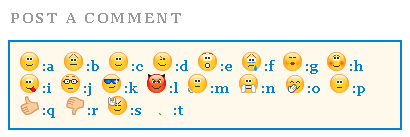
Note:- To change the appearance of the rectangular block simply edit the code in bolded green colour
5.. Now find </body> and paste the code below just above </body>
Note:- You can also try adding the code below just above </head> instead.
<script type='text/javascript'>
//<![CDATA[
a = document.getElementById('comments');
if(a) {
b = a.getElementsByTagName("DD");
for(i=0; i < b.length; i++) {
if (b.item(i).getAttribute('CLASS') == 'Author-comment-body' , 'comment-body') {
_str = b.item(i).innerHTML.replace(/:j/gi, "<img src='https://blogger.googleusercontent.com/img/b/R29vZ2xl/AVvXsEg7j6DrP30eOzpWH3g3g9BpkG9i8I5p4pzDXH20g2bWx00W4xzfJNiNPK9VQ2zZNBWBbOaOZV-id2O2mQ2ViE4lqB_nUwwqb2I_XPeiRW0RLWG3uZ9eRZII-_Vhk9S32QGull0pf377Gv0/s800/emoticon-0126-nerd.gif' alt='' class='smiley'/>");
_str = _str.replace(/:k/gi, "<img src='https://blogger.googleusercontent.com/img/b/R29vZ2xl/AVvXsEiysGhTYNNLhSP926ODJpwDANFRFCIwwLWCR7XKj1Q1qNuCmfMt9uDNFXrd_ZyeGjkvptDcPCv67tq5w0_805rIRbjzlOruYN4jeDGq0xflDVoQYlmDbC1XRkFr2BP8IOShnrn7kBb3sdE/s800/emoticon-0103-cool.gif' alt='' class='smiley'/>");
_str = _str.replace(/:l/gi, "<img src='https://blogger.googleusercontent.com/img/b/R29vZ2xl/AVvXsEgJ36h7bFsz6U_oENGHE9dFtaPQ1W8zf9cIEUeChha82ipDsAxVxWfyS51vdR6kCvwvKGNU97rU2EQngUdEfMuCFpi5TkJn0s4mZmw3gsD7Q3KB5JjtL_l20h7oAiIjjb6GJHIMpHD3KXE/s800/emoticon-0130-devil.gif' alt='' class='smiley'/>");
_str = _str.replace(/:m/gi, "<img src='https://blogger.googleusercontent.com/img/b/R29vZ2xl/AVvXsEjgDIERzsKxgiWiwSGu9Z3_OoHcaoYIn_41uZwEPHDRfz7I7605OvR4I_pSrejPAY3_DdFkUZobepJNZHHEttS0O6U1XH3q-a9BHNKQmIjt0UTE0H-d6OJM3NLK4vrvKVqvWEgyU0aZDes/s800/emoticon-0133-wait.gif' alt='' class='smiley'/>");
_str = _str.replace(/:n/gi, "<img src='https://blogger.googleusercontent.com/img/b/R29vZ2xl/AVvXsEiqoqunK_H6HpeKePu7H-oc_B4gQQqfdIu0qqBzr9wIMJe9LnB7ryYYIAKIdsCuNc7KFyL0R-KTr8yryLCauEXzdFS8NkbpcWqs_SvZS1Xz-eY8vGd6yvNQ8vqmCXzzWBCpHk8JH9e5f6w/s800/emoticon-0137-clapping.gif' alt='' class='smiley'/>");
_str = _str.replace(/:o/gi, "<img src='https://blogger.googleusercontent.com/img/b/R29vZ2xl/AVvXsEiuaxAi0gSmw_BfmIESF3_xe1k8iywQA_chFyFBJoHM8UcnAvdwX6fpLsTgHtgKrc6fHGEhc0ER35Mz0Za9pwBsdH66J6Q8HkeR5rTThJunMnmHWlD585-TGqKGSc1j7RRdDVUBIJp95EA/s800/emoticon-0136-giggle.gif' alt='' class='smiley'/>");
_str = _str.replace(/:p/gi, "<img src='https://blogger.googleusercontent.com/img/b/R29vZ2xl/AVvXsEht3kb02PJLv4E7T62CErfdJnsjtQvEGZL8nNFuy35Q6FIz4UAlzOeYGNQm-GbbBPS9QQQTctC3yeV6yjAFN8fT8pWQBqICsVUNCcJsbuYer90x1h4Lj-kVpUDr33XThI5jNfA0kJT_zJA/s800/emoticon-0141-whew.gif' alt='' class='smiley'/>");
_str = _str.replace(/:q/gi, "<img src='https://blogger.googleusercontent.com/img/b/R29vZ2xl/AVvXsEiticwqwtprIV0rFakv-b8xPKcIxv1ZmupyFEGOMHmWlz2oIhMYeSRSn1mATTrHSegcoTgEGEjP0Fj5ld2H2GRxOREey-9GpcupNRjFhA9gq7TSFgkso3YNix2kdquayvUWReWc8c0rT80/s800/emoticon-0148-yes.gif' alt='' class='smiley'/>");
_str = _str.replace(/:r/gi, "<img src='https://blogger.googleusercontent.com/img/b/R29vZ2xl/AVvXsEjRZtacoOzWQOHd2XEaS2X6g07rk50WdLrQFl8LepJEzb0edlWPnuLpfR5Cie9IQpLXVFGlnDkiXeMEiQxl3DpKyZ84zekJJinLntUtvLhCDxcIQ1NPj2sz1-a9masTnpsPPliMDG8YieU/s800/emoticon-0149-no.gif' alt='' class='smiley'/>");
_str = _str.replace(/:s/gi, "<img src='https://blogger.googleusercontent.com/img/b/R29vZ2xl/AVvXsEjaypsanw_95VYOzKhd3nXXsNDxoaEH3i9lIh7DAgkDYZwFKdSfSn7yT4z60zZJevgdkfPABNtlqCc-6Tjd6oESGZvc8S1wrnwEs0vHlL9EEPlIE81CS8F4DK62UZqRZjaepDuQlMXOEBQ/s800/emoticon-0155-flower.gif' alt='' class='smiley'/>");
_str = _str.replace(/:t/gi, "<img src='https://blogger.googleusercontent.com/img/b/R29vZ2xl/AVvXsEjst74Ek5inMCkfDAe6WfCQH1IowqZsO9ufQgh9fx14Or1tDwOe58dh6p7zanN9o3sCoysdfTM0Rx7oKWCRJXQjNVqdXKaopc3V7qTJeZh2RYvM1UUMOU6dMTw3crcvKhFc2fyPMGfp_wI/s800/emoticon-0178-rock.gif' alt='' class='smiley'/>");
_str = _str.replace(/:a/gi, "<img src='https://blogger.googleusercontent.com/img/b/R29vZ2xl/AVvXsEi1eFmz9eqSJXMVM9jT50A4JptAYoedjzIAAHW0b1SjFK4AqSHzMW12BqTl-AvbvfPgKca0aa29zKp0-T9BneC7mKdt3w-dBDPckrKC23Hza5plb8g_7pauqFBg2GvbuYGMWvvwWzeLk24/s800/emoticon-0100-smile.gif' alt='' class='smiley'/>");
_str = _str.replace(/:b/gi, "<img src='https://blogger.googleusercontent.com/img/b/R29vZ2xl/AVvXsEgkwZa7_S4jZa9dWMVldTw5cx7ZEnsxI2ZyD1aaHukIi2PbjeoW_3aiBUqO5ETNWFL24Vktm-JgwBXhUzfRCJB4vysdpeXfN_B5zU4ZgQrZ8_wmTDtygp0JgfyO87HOnc7L0QbXaJOEEH0/s800/emoticon-0101-sadsmile.gif' alt='' class='smiley'/>");
_str = _str.replace(/:c/gi, "<img src='https://blogger.googleusercontent.com/img/b/R29vZ2xl/AVvXsEjzSaZDWMJsjhstcmvm0_vKaUkMSH2S7PNcPe783lMHuZs58wps7ySiWdXa3v7FqmReXdq35Efwa1l4um6dOrTneF4sjF0wqZvtqvwoiIsFweHiIkdrZKJLvkDPmcq9ulHA3fTUeEyFSbk/s800/emoticon-0102-bigsmile.gif' alt='' class='smiley'/>");
_str = _str.replace(/:d/gi, "<img src='https://blogger.googleusercontent.com/img/b/R29vZ2xl/AVvXsEitfUP5lwYISawQdBfAA76JcDAcv_CQYlZcVQ8ItKahTwysIMIgG0R_Y85zy78kCiZlMY9iuu0rFSBOIH1hjX1iflil97GR5WWh09RMTg1J51OQrJL871OtP0Evp_cDuR5_HzRfW9lFk_Y/s800/emoticon-0105-wink.gif' alt='' class='smiley'/>");
_str = _str.replace(/:e/gi, "<img src='https://blogger.googleusercontent.com/img/b/R29vZ2xl/AVvXsEgL-Y077QZkrxnprvHY5OeiKVNLFmPq_vFIk7H2og_jKAoN20SMP75GpHV2ZDpzvcVFPWu-ZP3ZW_tFe84msUGHXhbHaWHc6Nd2xw4xdlmuE1lkA8-iWsWeqEU_UbCt7xqefHnewpZGjhU/s800/emoticon-0104-surprised.gif' alt='' class='smiley'/>");
_str = _str.replace(/:f/gi, "<img src='https://blogger.googleusercontent.com/img/b/R29vZ2xl/AVvXsEjs2LUWT125FombGyA55uf2B8R3ihjVs04m333SoqMzTkr3B8_1hGouKF060PVylZ7eFeXIHvSEdztj0FCQZJkPK_LP1axRs0La5cJ2XibjGAuIGNUTLK9tS2udGxJPdv3aJa98G00-KS4/s800/emoticon-0106-crying.gif' alt='' class='smiley'/>");
_str = _str.replace(/:g/gi, "<img src='https://blogger.googleusercontent.com/img/b/R29vZ2xl/AVvXsEhZyLqNVvEc0LVxE_7e_bS5U5X6aaHRxKe-Ozw-XK_jJFxYu1_Sd_w9VJdZI19QFYqdX4HWAG734KwmmctGPFXk1pJSUceirHCMk_CRaemEXrjoTD50cr0p8cp9fIb6idk1sYenNstAsUo/s800/emoticon-0109-kiss.gif' alt='' class='smiley'/>");
_str = _str.replace(/:h/gi, "<img src='https://blogger.googleusercontent.com/img/b/R29vZ2xl/AVvXsEhjHmMY58YaTYE1ziZcQeXNmE0CC3dxaQvYd-Yks-Mhxqzm57WlhRPZGzdt5hdCmbc-pmeqHoIFpIqEH8YssNqUMGks9fYYfemoHG7GffWNQxP-NeF_y9_GKuy6hELXcroXg05PY3Ncujk/s800/emoticon-0111-blush.gif' alt='' class='smiley'/>");
_str = _str.replace(/:i/ig,"<img src='https://blogger.googleusercontent.com/img/b/R29vZ2xl/AVvXsEgb_kd-SHPiI-_-DAwbj3L5atf-sT38727G77dOCKgWGNh1R87ps_7mF2IYxrlYNGH7OZrO9968HPqOP8e1i5niuslR6Zi2VvwEJWlv-VWKBzUPZE04aCViEKut_KMYwHzzO-08KRnnUS4/s800/emoticon-0110-tongueout.gif' alt='' class='smiley'/>")
b.item(i).innerHTML = _str;
}
}
}
//]]>
</script>
6. Save your template and view the beautiful change! :D
The Emoticons Will appear In Both Readers and Author’s Comments!
As you know the yahoo smileys tutorials has one disadvantage and that is that the emoticons appear only in readers comments and can not be displayed in author comments. In order to make the emoticons appear even in Authors comment block then simply replace the code in bolded red colour above (i.e Author-comment-body ) with the CSS class for blog owners customized comments. If you do not know how to do it then simply share your blog URL and I will let you know what code should you paste instead of Author-comment-body
How did you find it?
I made it as simple as it could be and I hope it will add an extra sweet flavor to your blogs. The codes for the emoticons are made easy so that readers could easily use an emoticon of their choice. You can increase the number of emoticons and can also customize the look and feel of the rectangular box of emoticons that will appear above the comment form. I wrote this in hurry so if you have any questions just drop me a hi! :>>Monday, July 4, 2011 3
Sunday, June 26, 2011
 I shared a tutorial yesterday on 14 amazing ways to stylize Blogger Blockquote and today I have a really interesting and exceptional blockquote for those who write tutorial based articles on their blogs and websites. I have created two blockquotes, the first one has no number list while the second one comes with automatic number list and looks like your notebook diary. The number list starts at #1 and end at #112. Both of these blockquotes can easily be customized to suit your web layout.
 So let’s have a look at each one of them first.
Blockquote With Auto Number List:

Blockquote Without Number List:

Liked the difference? Now let’s learn how to add each one of them to your Blogger Blogs.
Adding Blockquote With Auto Number List To Blogger
To add this blockquote to blogger, follow the simple steps below,- Go to Blogger > Layout > Edit HTML
- Backup your template
- Search for .post blockquote and delete it along with all its occurrences. In most templates the codes look like this,
.post-body blockquote { line-height:1.3em; }
If you couldn’t find such code then it is OK.
OR
.post blockquote{ bla bla bla} - Now search for ]]></b:skin> and just above ]]></b:skin> , paste the code below,
blockquote {Customization:-
background: #fff url(https://blogger.googleusercontent.com/img/b/R29vZ2xl/AVvXsEjdYiA_adSbYeiiY_sFUjm9Wa_Ch2ajy2kp6O4ib9otV-EVDkjcJK_K6EVpsCMMUY5Mn8oDaKyWgEGzR6INsvV00xBvziRIrw73pyILuY09jb1QRn3JjoZ4nKIweyO9m1JdeahwDfkWqH0/s1600/notebook-with-numbers.gif) repeat-y;
margin: 0 20px;
padding: 0px 20px 5px 55px;
color:#7a7a7a;
font: bold 0.9em "Comic Sans MS", verdana;
line-height: 153%;
}
blockquote p {
margin: 0;
}
You can also change the Number list background by replacing the bolded image link in the code above with the image URLs of one of these blockquotes.
Tip:- Right Click the links below each blockquote and choose Save Link As Or Copy Link Location to its image URL.
font :- It includes font style, size and type respectively. Match the colours with the code above for reference. Font style can be bold, normal , italic or bold italic


color :- This refers to text colour. You can use a different font colour using our color chart
Adding Blockquote With No Number List To Blogger
To add this blockquote simply follow the same steps as shared for the blockquote with auto number list. But for step#4 paste the code below instead,blockquote {You can replace the Background Image link with one of these.
background: #fff url(https://blogger.googleusercontent.com/img/b/R29vZ2xl/AVvXsEgxv0X6y1SjN9XS6GhJuIILp_lBcJhddCl0dfyNE8dG66NxK5RGHTo0jVOZVKIZvJhsYQmp0tDPnOoM3vZIO-kloLT6ldLvD7Hxy1D3A3fK1PUMipiYl1MVuuty6-6SIZGHmw-jxPcG5UQ/s400/notebook.gif) repeat-y ;
margin: 0 20px;
padding: 20px 20px 20px 55px;
color:#7A7A7A;
font: bold 0.9em "Comic Sans MS", verdana;
line-height: 155%
}
blockquote p {
margin: 0;
}
Tip:- Right Click any of the blockquote images below and choose Save Link As Or Copy Link Location to get its image URL.


That’s All!
Note:- If you want to increase the number range for the blockquote with auto number list or if you want to create an image with your custom colours than I can provide you the PDF source file for it. But it will be given to subscribers only. If you haven’t subscribed yet, kindly do so to avail unlimited download resources from us to you.Let me know how was this new discovery :)
Sunday, June 26, 2011 6
Saturday, June 25, 2011
 A block quote or block quotation is an extract in a written document, set off from the main text as a distinct. We all quote great authors but we all must present these great words in an extra ordinary way using a beautiful blockquote. We have created simple CSS codes for around 14 Blockquotes, which are outstanding in look and feel. These blockquotes will give you an idea on how to create your own customized blockquote for your blogs and web pages.
Have a Look at each one of them. Details of adding the blockquote to your blogs and websites are given in the implementation and customization section.
Blockquote With a Fancy Border and Owl Image

Blockquote Code:
blockquote {
margin : 0 20px;
padding: 60px 30px 40px 20px;
background : #F1F8FE url(https://blogger.googleusercontent.com/img/b/R29vZ2xl/AVvXsEglZL1dw46T2WvbWqFDSbbGbGmhAFF4wqRL_h8W4RC0nSweFTYd7XtmZIPzLdYMFaGbNh1NJ_TrS7253LPp0bXJehxOZm90zF6X8eWaO1owcJk8cJbjYBY4MMA7p7dvLj1xvPeymH8wBnY/s400/owl.png) no-repeat 350px 5px;
font: normal .9em "comic sans ms", Courier,"Times New Roman", Times, serif;
color : #000;
border-left: 8px dotted #DAB547;
}
blockquote p {
margin: 0;
padding-top:10px;
}
Blockquote With a Purple Corner Label and Border At Bottom

Blockquote Code:
.post blockquote {
margin : 0 20px;
padding: 70px 20px 20px 40px;
background : #E4EAFE url(https://blogger.googleusercontent.com/img/b/R29vZ2xl/AVvXsEiF5dhQGxUJEggOOof6IZMGht5ElFxnbMHSr1u4xSemxvHgsvSpugMquGKIzlutM33wAtg9_pEiTFQ3Z-xgx77nHDcqXH-kMD1Fk5lkUDMMvGzTL3-AxWLqqURzGx4nuTX2j76gZdG0q8U/s400/angular-purple.gif) no-repeat top left;
font: bold 1em Helvetica, verdana, Georgia, "Times New Roman", Times, serif;
color : #000;
border-bottom : 5px solid #435388;
}
.post blockquote p {
margin: 0;
padding-top:10px;
}
Jigsaw Blockquote With An Image At Right Corner

Blockquote Code:
.post blockquote {
margin : 0 20px;
padding: 10px 20px 25px 20px;
background : #9FCFFF url(https://blogger.googleusercontent.com/img/b/R29vZ2xl/AVvXsEjPejhHqP5hCvvkQPkmaHBd7w1kU0RS5yn5s8uHQwDDXYpfPUL1Djm7giMDp-V9TIRbXE-6QCISSc9yflGxNcKgBgGBXn7bXfrR-fqsJ4jYrJx4v1SwtlR6H61d5pfT61v8canPQE3kwDU/s400/block22.gif) no-repeat right bottom;
font: bold .9em "comic sans ms", arial, Helvetica,verdana, Georgia;
color : #484848;
border: 5px dashed #fff;
}
.post blockquote p {
margin: 0;
padding-top:10px;
}
Blockquotes With Classic Left Borders

Blockquote Code:
.post blockquote {
background: #F3F3F1 url(https://blogger.googleusercontent.com/img/b/R29vZ2xl/AVvXsEgmHPzdKfZJMxemRnKlETZAUQLmk3suvxqmhsKRVJKGI0TIJnJu-8jvP3r8fBts5x7PlUphmaSRAqPY8Oi2iUCXm5Ec2wr4y-LQBR0y4x81sixAdlRFFb6qT-fcWxhWB1r3Nq1fk1zaqgQ/s1600/comma-side-orange1.gif) ;
background-position:;
background-repeat:repeat-y;
margin: 0 20px;
padding: 20px 20px 10px 45px;
font-size: 0.9em;
font: italic 1.2em Georgia, "Times New Roman", Times, serif;
}
.post blockquote p {
margin: 0;
padding-top: 10px;
}

Blockquote Code:
blockquote {
background: #484B52 url(https://blogger.googleusercontent.com/img/b/R29vZ2xl/AVvXsEgy0aFzjGqo-ziF6NrwxIcq_u-v29KBAJeE99T4O8fGcUBK1kdwhLjWvVJYQzTSF8g08fEE0J1gA9mjC6wBI9_9PrqjPlnbqapn-8ip2p7mf1Ui5OhQaGmGMo2lBo0tx4kpwCEDX2ASk5s/s1600/green-black-side.gif) ;
background-position:;
background-repeat:repeat-y;
margin: 0 20px;
padding: 20px 20px 20px 50px;
color:#C7CACF;
font: normal 0.9em Helvetica, verdana, serif, Georgia, "Times New Roman";
}
.post blockquote p {
margin: 0;
padding-top: 10px;
}
Blockquote With A Brown Corner Label

Blockquote Code:
.post blockquote {
margin : 0 20px;
padding: 20px 60px 80px 20px;
background : #FEE4E3 url(https://blogger.googleusercontent.com/img/b/R29vZ2xl/AVvXsEhFQttDnelBK-fs9fRl1TOCs5uWHgaGUFdoDUE2dgDY_EoqRmnlFtYpCqIqxPbSZTABKyn_wrAArigcQ1vL81ilz3Pt5NUGQMk9_vesNu-7LyC_BB538le8cum4zrzDqzhiJurs6NlZw9g/s400/angular-right.gif) no-repeat bottom right;
font: bold italic 1em Georgia, verdana, Helvetica, "Times New Roman", Times, serif;
color : #000;
border: 1px solid #DDD;
}
.post blockquote p {
margin: 0;
padding-top:10px;
}
Blockquotes With Inverted Commas
 Blockquote Code:
.post blockquote {
font: 18px normal Tahoma, sans-serif;
padding-top: 10px;
margin: 5px;
background: url(https://blogger.googleusercontent.com/img/b/R29vZ2xl/AVvXsEjYbC-3pAJzXGey7ayzjSxk8BG_E0DzJ7zypuYsMdv64QE7yOW7T8sSdoXM1KGTI8JYAupRRvJQC4-EAFuL6VCPvdekrS0Vku8qU0clllqU-UXIXbRgV-6IWsLEy9VOXcCmk7Fb4Px2tC4/s400/comma-left.gif) no-repeat top left;
text-indent: 65px;
}
.post blockquote div {
display: block;
background: url(https://blogger.googleusercontent.com/img/b/R29vZ2xl/AVvXsEi7SPbhECz4FoUaOQFAwdqitY5p3tCMdsstkV6TSor8BNC1WU-9MbRSL-CKD-OUOurNxj15z1j9EHlksudquyVX1to6jr0nfeEHUoCL0Ck7r7QXG3WDBvGfRmkX0J9k8yeB8X1iqj4ja7Y/s400/comma-right.gif) no-repeat bottom right;
padding-bottom:10px;
}
.post blockquote p {
margin: 0;
padding-top:10px;
}

Blockquote Code:
.post blockquote {
font: 18px normal Tahoma, sans-serif;
padding-top: 10px;
margin: 5px;
background: url(https://blogger.googleusercontent.com/img/b/R29vZ2xl/AVvXsEj3mqBEE50cRhNsU1tu5eCPzxFdrIW8BBXKGpzjKmvZnLu3rRbdxh4SFCyGJZ3joZLUy47fTKNfoY2_1vQ_u3W3p-gAMGwr-auilz-XsgYrVWVkdIulp14yvzP2z3kihiQtIUbO_FPBVUk/s400/comma1-left.gif) no-repeat top left;
text-indent: 65px;
}
.post blockquote div {
display: block;
background: url(https://blogger.googleusercontent.com/img/b/R29vZ2xl/AVvXsEj0pSGyEEyIOjOVMCeL5d7AJsQPkBzBtUAJX4HH14fH49n7RnhEYA-fxuBIWP8LOrsJEKK7_DZ5Iow4PkXE-YJ5V_xX-R6AETjUaUOt73YpMOFGfAwUz79gOFDYN0GBylyAuhSRjGyj9yk/s400/comma1-right.gif) no-repeat bottom right;
padding-bottom:10px;
}
.post blockquote p {
margin: 0;
padding-top:10px;
}

Blockquote Code:
.post blockquote {
font:bold italic .9em "comic sans ms", Tahoma, sans-serif;
padding-top: 25px;
margin: 5px;
background: url(https://blogger.googleusercontent.com/img/b/R29vZ2xl/AVvXsEi0csO_Z04_HMtmRv7Tq4fpeVH8GIvrw3PFwLifN5fERYpHX5307h0vxwlIJsv9J9PqBEqlr4Fx7LOQIHmRPUTKYl_UThvM-2vt_EyM33BeqWfiZso0qJiLtA2FR5YsL1hhG5dpaHidXfo/s400/left.gif) no-repeat top left;
text-indent: 65px;
color:#6299E4;
}
.post blockquote div {
display: block;
background: url(https://blogger.googleusercontent.com/img/b/R29vZ2xl/AVvXsEg9DYwBw9KWc2kszqNwsPlUDVWWEgJP8LM0CKdxwXvRy2Hn8SEy3hxTe15PdzVgTyyZLhCBE-e85regF5o7YxHVxNHcVNrDnDmSU8qgw76kTFJdhWnis_0301d97nwu_ONFR0XGQ9nEwL4/s400/right.gif) no-repeat bottom right;
padding-bottom:30px;
}
.post blockquote p {
margin: 0;
padding-top:10px;
}
 Blockquote Code:
.post blockquote {
font: italic 1em "comic sans ms", Tahoma, sans-serif;
padding-top: 10px;
margin: 5px;
background: url(https://blogger.googleusercontent.com/img/b/R29vZ2xl/AVvXsEiRQbMq4O2eKCTKCgf8GpbIq2yMFBcVZHH2YaeEO6FhRv5p4XuLkNMfb_RBMPEpQgZVegcF7nI-NKWN111dxAaTWWN4eEawSJHL3yl2uHdIUdVnlDf0ESOwhnXWoPzZTPfIMpYgIh7kV_E/s400/comma2-left.gif) no-repeat top left;
text-indent: 65px;
}
.post blockquote div {
display: block;
background: url(https://blogger.googleusercontent.com/img/b/R29vZ2xl/AVvXsEhN3ulZEs5JswVeVJIGf4D-Jkkm_lI5q_mUOOI26m-TsbinjQkuoscPVb-ot3w2SCBFZ7_aJ1Wzcc1aIO0JzJ1YhgIA1lzBTKTQrqIp5C6EWXTgzeVjT1U0IjYN77mF-WNs7djQJfKZ4_Y/s400/comma2-right.gif) no-repeat bottom right;
padding-bottom:10px;
}
.post blockquote p {
margin: 0;
padding-top:10px;
}
Blockquote With Well Aligned Image At Top

Blockquote Code:
.post blockquote {
margin : 0 20px;
padding: 70px 20px 20px 20px;
background : #E7E5DC url(https://blogger.googleusercontent.com/img/b/R29vZ2xl/AVvXsEiPxDi7kmSF31ylgeYlilcBz2GxOfDbJXAi_F_a9ZKaNVv_xptLy6CuOCciC_cZTzEZeJ1VUSPplSLMf4d1jS0s3IRKj-kB_zXMu6G_vHYVO0lOrYzrAt28ME4EMtlUacGNapKtAh6YJBk/s1600/block333.gif) no-repeat top;
font: normal 1em "comic sans ms",Helvetica, Courier,"Times New Roman", Times, serif;
color : #000000;
border-bottom : 7px solid #FF0000;
}
.post blockquote p {
margin: 0;
padding-top:10px;
}
Blockquote With Canopy Style Image At Top and Bottom

Blockquote Code:
.post blockquote{
margin : 0 20px;
padding: 50px 30px 50px 30px;
background : #FFF url(https://blogger.googleusercontent.com/img/b/R29vZ2xl/AVvXsEh3XjM4E_y2u0KIbWt3WsiCTSBRGISFkaPdNXHZ3C0cbNirWCKdn8shJMM3_UaU50MbB4U1QBI0qdnCGhyAZRhUqtMtfBHI1l9ADkM-y-NqYTPUE1_E8nrl6LNAIRBO4niVmtkAIsfm4Nw/s1600/BLOCK1-TOP.gif) no-repeat top;
font: bold italic 1em Helvetica, verdana;
color : #000;
}
.post blockquote div{
background : #FFF url(https://blogger.googleusercontent.com/img/b/R29vZ2xl/AVvXsEgc9dcCZJ7VFBfBEwwHx7pUF0tSvS4vOUDugopZP3C0BpJqhaQ8j88GlTDIsmcgzYmfUWV7rHgJvoEHDoVNwIUAOrZO3fW66uMNbPKc4rEkOeNgNmXs47hYBxQ9BuuT6saZBeJdZbyQh9Y/s1600/BLOCK1-BOTTOM.gif) no-repeat bottom;
padding-bottom: 50px;
}
.post blockquote p {
margin: 0;
padding-top:10px;
}
Box Style Blockquote Surrounded By Borders

Blockquote Code:
.post blockquote {
margin : 0 20px;
padding: 70px 20px 30px 20px;
background : #E7E5DC url(https://blogger.googleusercontent.com/img/b/R29vZ2xl/AVvXsEjH_45WcgDmyIqxSbJvR6WWjBZYm-rhsIFg0Tw7M9dP-O0xizttNqz7jcDwt71P_q8NlhyphenhyphenEPCfObgYYZefugy4MyGYtwWphAaaFiuJyIhURwVjCLAmtnxnEFfdQGLdTOqdI9mu2UMGbfUs/s400/block3331.gif) no-repeat top;
font: bold .9em Helvetica, "comic sans ms",Courier,"Times New Roman", Times, serif;
color : #343434;
border-left : 7px solid #FF7802;
border-right : 7px solid #FF7802;
border-bottom : 7px solid #FF7802;
}
.post blockquote p {
margin: 0;
padding-top:10px;
}
The Monkey Man Blockquote!!!
Once you get an idea on how to use these blockquotes then you can create artistic and some funny blockquotes like the one below,
Blockquote Code:
.post blockquote{
margin : 0 35px;
padding: 80px 0px 0px 0px;
background : #E6F1FA url(https://blogger.googleusercontent.com/img/b/R29vZ2xl/AVvXsEhcNeXDq8rO210T2ZHMIs7kYV8l02zmA5r-zxM3RiPUI3qeQd-WkDdaqiByFjXxgyl6ddlbAuf3wl2wit4yESP631JuGTmcv5ppOLZ3hFAzYcQbuIiCeP4-p5fkTFtGmTwc36PnnPjLIzo/s400/head2.gif) no-repeat top;
font: normal 1em "comic sans ms", Helvetica, verdana;
color : #666;
}
.post blockquote div{
background : #E6F1FA url(https://blogger.googleusercontent.com/img/b/R29vZ2xl/AVvXsEh401BPzFuBC9D1sAxQHJeahfQUU-3xJaAKqN_xyFM0lbx_AOUyuT1XisuDn5WcKLSFbasDFIf95ZhYNpSAQnMNVVSxmPz5pu17NRp803ovOiqiavCb-LQO5zaf4U4YFSnDRxCiT5bMx0k/s400/head-bottom3.gif) no-repeat bottom;
padding-bottom: 50px;
}
.post blockquote p {
margin: 0;
padding: 20px;
}
Implementation and Customization:-
Implementaion:-Now To add One of these amazing and unique blockquotes to your blogs, do the following,
- Go to Blogger > Layout > Edit HTML
- Backup your template
- Search for .post blockquote and delete it along with all its occurrences. In most templates the codes look like this,
.post-body blockquote { line-height:1.3em; }
If you couldn’t find such code then it is OK.
OR
.post blockquote{ bla bla bla} - Now search for ]]></b:skin> and just above ]]></b:skin> , paste the code for one of your favourite blockquotes. I am giving a sample code below
.post blockquote {Customization:-
margin : 0 20px;
padding: 60px 30px 40px 20px;
background : #F1F8FE url(Paste Image Link here) no-repeat 350px 5px;
font: normal .9em "comic sans ms", Courier,"Times New Roman", Times, serif;
color : #000;
border: 8px dotted #DAB547;
}
.post blockquote p {
margin: 0;
padding-top:10px;
}
Important areas to be customized are bolded. Where,
- padding: It refers to the distance of the text from blockquote borders. Which goes in this order –> Top Right Bottom Left
- background :- This includes Blockquote background color and image used in it. The six digit value is the background color and image link is inserted in place of bolded text in this part-> url(Paste Image Link here)
- font :- It includes font style, size and type respectively. Match the colours with the code above for reference.
- color :- This refers to text colour. You can use a different font colour using our color chart
- border :- This refers to border width, style and colour respectively.
- All other blockquotes can be customized in similar way.
Note:- For Blockquotes with inverted commas, canopy style and the Monkey Man, there is a little more coding required. Read below
Guide:- For above mentioned blockquotes you need to add some extra tags inside blogger editor as explained below,
Now Whenever you have written a Quote inside the compose mode of Blogger Editor simply switch to the HTML mode and add two tags i.e <div> and </div> between the blockquote tags as demonstrated below,
<blockquote><div>Your Quote Will Be Here</div></blockquote>
Play With Each Blockquote Code!
To get more used to the codes above you need to play with some CSS using our HTML Editor.Inside MBT HTML Editor paste the any of the blockquote codes above between <style> and </style> and just below </style> paste this code,
<blockquote>Write Anything Here As a Text</blockquote>For example for the Owl Blockquote paste the codes in this pattern,
<style>
blockquote {
margin : 0 20px;
padding: 60px 30px 40px 20px;
background : #F1F8FE url(file:///c:/Documents%20and%20Settings/mustafa.MYBLOGGERTRICKS/Desktop/blockquote/owl-icon-48.png) no-repeat 350px 5px;
font: normal .9em "comic sans ms", Courier,"Times New Roman", Times, serif;
color : #000;
border-left: 8px dotted #DAB547;
}
blockquote p {
margin: 0;
padding-top:10px;
}
</style>
<blockquote>Write Anything Here As a Text</blockquote>
That’s All!
I have created all images with text “Copyrighted Coding” or “Scanned Copy” etc. If you want to write something else than use my images as reference size to create your own custom images.
I will publish two consecutive posts where I will share a blockquote with auto number list and a blockquote with a blinking bulb! Make sure you subscribe to be updated about latest CSS and HTML tricks related to Blogger.
Do not forget to tell us how useful or unique this post was for you.
Saturday, June 25, 2011 0
Subscribe to:
Posts (Atom)


